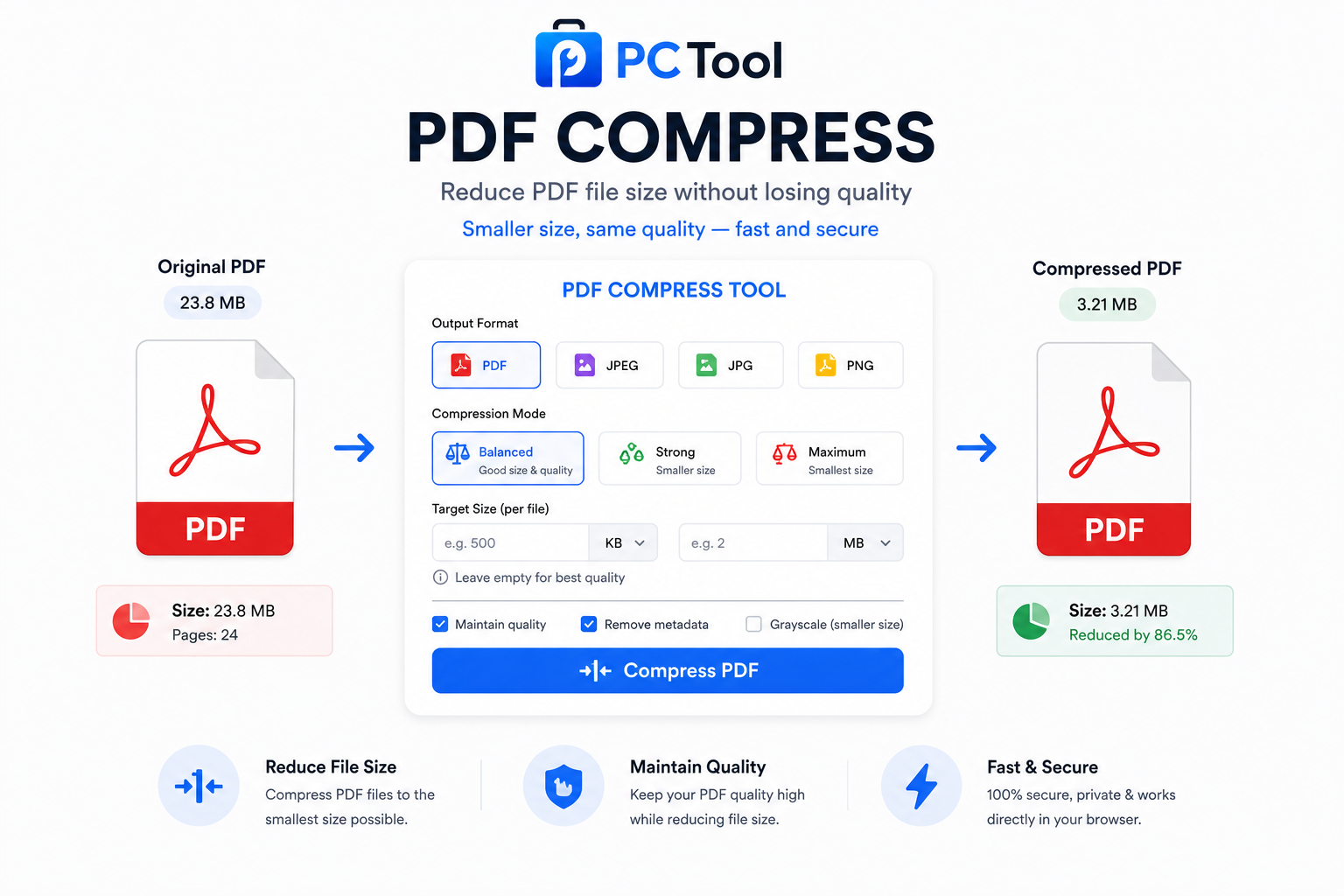
📌 What is Compress PDF Online Free - Reduce PDF File Size?
PDF compression is the process of reducing the file size of a PDF document while preserving its content, layout, and readability. PDF files can grow very large very quickly — a document with several scanned pages, high-resolution photos, or embedded graphics can easily reach 10 MB, 20 MB, or more. This creates practical problems in everyday situations where file size limits are strictly enforced.
Email providers like Gmail and Outlook have attachment limits of 25 MB, and many corporate email systems are far more restrictive. Government portals for income tax, passport, and property registration often cap document uploads at 1 MB or 2 MB. Job application portals frequently reject resumes and portfolios above 5 MB. Banking and insurance platforms require KYC documents and claim submissions under specific size thresholds. Courts and legal platforms have strict limits on e-filed documents. In all these cases, a large PDF that cannot be compressed means your submission is rejected before it is even reviewed.
PDF compression works by re-encoding the images embedded within the document at a lower quality level. Most large PDFs are big because they contain photographs or scanned pages at full camera resolution — far higher than what is needed for reading on screen or printing at standard quality. By reducing the JPEG quality of embedded images using a precision binary search algorithm, our tool can reduce PDF size by 50% to 90% while keeping the document perfectly readable.
Our Compress PDF tool handles up to 10 PDFs simultaneously. You can set a precise target size in KB or MB per file, and the tool guarantees the output will never exceed your specified limit. You can also convert PDF pages to image formats like JPEG or PNG directly from this tool if needed.
❓ How to Use This Tool
Compressing your PDF files is fast and straightforward. Here is the complete step-by-step process.
Step 1: Upload Your PDF Files
Click the upload zone or drag and drop your PDF files onto the page. You can upload up to 10 PDF files at once, each up to 50 MB in size. Once uploaded, each file appears in the file list with its name and original size displayed so you can see exactly how much reduction is needed.
Step 2: Choose Output Format
By default, the output format is PDF — your compressed files remain as PDFs with all pages intact. Optionally switch to JPEG, JPG, or PNG if you need to convert the PDF to an image format. Note that for multi-page PDFs converted to image format, only the first page is extracted as the image.
Step 3: Set a Target Size (Optional)
This is the most powerful feature of the tool. If the portal or platform you are submitting to has a specific file size limit — such as "PDF must be under 1 MB" or "maximum 500 KB" — enter that value in the KB or MB field. The tool applies a binary search algorithm on JPEG quality inside the PDF to land just at or below your target with high accuracy. The output will never exceed the size you specify.
If you leave the target size empty, the tool applies smart auto-compression at the best quality-to-size ratio for general use.
Step 4: Compress and Download
Click "Compress and Download." A full-screen progress overlay shows real-time progress with a percentage bar as each file is processed. Once complete, the results panel lists every compressed file with its new size and the percentage saved. Download each file individually or click "Download All" to get all compressed PDFs in a single action.
All processing runs entirely inside your browser using pdf.js and jsPDF. Your PDF files are never uploaded to any external server, ensuring complete privacy and security.
✓ Features & Benefits
- Compress up to 10 PDF files simultaneously
- Set precise target size per file in KB or MB
- Output never exceeds your specified target size
- Convert PDF to JPEG, JPG, or PNG format
- Smart auto-compression when no target is set
- Individual or bulk download of all results
- Real-time progress bar with percentage indicator
- Supports PDFs up to 50 MB each
- 100% browser-based using pdf.js and jsPDF — no server upload
- Works on mobile, tablet, and desktop without any app install
- No registration or login required — completely free
💡 Tips for Best Results
For the best results when compressing scanned document PDFs, set a target size that gives you a reasonable margin below the portal limit. For example, if the limit is 1 MB, set your target to 900 KB — this ensures the file passes even if the portal measures size slightly differently.
PDFs that are large because of embedded photographs compress very well, often by 70% or more. PDFs that are large because of embedded fonts, vector graphics, or complex layouts may compress less dramatically since those elements do not benefit from JPEG quality reduction.
If you need to compress a PDF below a very small target like 100 KB and the result appears blurry, consider splitting the PDF into individual pages first using a PDF split tool, compressing each page separately, and then merging them back together. This gives you more control over quality per page.
❔ Frequently Asked Questions
How do I compress a PDF to a specific size like 1 MB or 500 KB?
Upload your PDF, enter your target size in the KB or MB field, then click Compress. The tool uses a binary search algorithm on the JPEG quality of embedded images to land just at or below your target. The output file will never exceed the size you specify.
Can I compress multiple PDFs at once?
Yes. Upload up to 10 PDFs in a single session. Each file is compressed independently using the same target size setting. Results are listed individually so you can download each file separately or download all at once.
How much can a PDF be compressed?
It depends on the content. PDFs containing scanned photographs or high-resolution images typically compress by 50% to 90%. PDFs that are large due to embedded fonts, complex vector graphics, or many pages of plain text may see more modest reductions of 20% to 40%.
Can I convert a PDF to JPEG or PNG using this tool?
Yes. Select JPEG, JPG, or PNG as the output format before compressing. For multi-page PDFs, the first page is extracted and converted to the selected image format. For converting all pages individually, use the PDF to Image tool.
Will compressing reduce the quality of my PDF?
Compression works by reducing the JPEG quality of images embedded in the PDF. At moderate compression levels the difference is invisible on screen and in standard prints. At very aggressive targets the images may appear slightly softer, but all text and layout elements remain perfectly sharp since they are vector-based and unaffected by JPEG compression.
Are my PDF files uploaded to a server?
No. All compression happens entirely inside your browser using pdf.js and jsPDF. Your files are never sent to any external server, ensuring complete privacy. The tool also functions offline once the page has fully loaded.
What is the maximum file size supported?
Each PDF can be up to 50 MB. You can compress up to 10 PDFs per session. There is no limit on how many sessions you run.
📌 PDF कॉम्प्रेस करा ऑनलाइन - PDF फाईल साइज कमी करा काय आहे?
PDF compression म्हणजे PDF दस्तऐवजाचा फाईल साइज कमी करणे, त्यातील मजकूर, layout आणि वाचनीयता टिकवून ठेवताना. स्कॅन केलेल्या पृष्ठांसह किंवा उच्च-रिझोल्यूशन फोटोंसह PDF सहजपणे १०-२० MB पर्यंत पोहोचतो.
Gmail आणि Outlook मध्ये 25 MB attachment limit आहे, पण अनेक कॉर्पोरेट email प्रणाली यापेक्षा खूप कमी असतात. आयकर, पासपोर्ट आणि मालमत्ता नोंदणीसाठी सरकारी पोर्टल अनेकदा १ MB किंवा २ MB मर्यादा ठेवतात. नोकरी अर्जाचे पोर्टल ५ MB पेक्षा मोठ्या रेझ्युमे नाकारतात. बँकिंग आणि विमा प्लॅटफॉर्म KYC दस्तऐवजांसाठी विशिष्ट मर्यादा सांगतात.
PDF compression embedded images ची JPEG quality कमी करून काम करते. आमचे टूल precision binary search algorithm वापरून PDF साइज ५०% ते ९०% पर्यंत कमी करते. एकावेळी १० PDFs compress करता येतात आणि target size guarantee केली जाते.
❓ हे साधन कसे वापरावे
पायरी १: PDF फाईल्स अपलोड करा
अपलोड झोनवर क्लिक करा किंवा PDF फाईल्स ड्रॅग-ड्रॉप करा. एकावेळी १० PDFs, प्रत्येकी जास्तीत जास्त ५० MB.
पायरी २: Output Format निवडा
PDF (default) — सर्व पाने intact राहतात. किंवा JPEG, JPG, PNG निवडा — multi-page PDFs साठी फक्त पहिले पान convert होते.
पायरी ३: Target Size सेट करा (ऐच्छिक)
"PDF जास्तीत जास्त १ MB असावा" अशी अट असल्यास KB किंवा MB फील्डमध्ये टाका. Binary search algorithm वापरून output नेहमी target च्या आत राहतो.
पायरी ४: Compress करा आणि डाउनलोड करा
"Compress and Download" दाबा. Real-time progress bar दाखवेल. निकालात प्रत्येक फाईलचा नवीन साइज आणि बचत percentage दिसेल. स्वतंत्रपणे किंवा "Download All" ने एकत्र डाउनलोड करा.
✓ वैशिष्ट्ये आणि फायदे
- एकावेळी १० PDFs compress करा
- KB किंवा MB मध्ये target size per file
- Output कधीही target पेक्षा जास्त होत नाही
- PDF ते JPEG, JPG, PNG कन्व्हर्जन
- Real-time progress bar
- Individual किंवा bulk download
- PDFs जास्तीत जास्त ५० MB पर्यंत
- १००% ब्राउझर-आधारित — सर्व्हरवर अपलोड नाही
💡 सर्वोत्तम परिणामांसाठी टिपा
पोर्टल limit पेक्षा थोडा कमी target ठेवा — उदाहरणार्थ limit १ MB असल्यास ९०० KB target ठेवा. स्कॅन केलेले फोटो असलेले PDFs ७०% पर्यंत compress होतात. Vector graphics किंवा fonts असलेले PDFs कमी compress होतात. खूप लहान target हवा असल्यास PDF split करा, प्रत्येक पान स्वतंत्रपणे compress करा आणि merge करा.
❔ वारंवार विचारले जाणारे प्रश्न
PDF नक्की १ MB किंवा ५०० KB मध्ये compress करता येते का?
होय. KB किंवा MB फील्डमध्ये target टाका आणि Compress दाबा. Binary search algorithm वापरून output नेहमी target च्या आत राहतो — कधीही जास्त होत नाही.
एकापेक्षा जास्त PDFs एकाच वेळी compress करता येतात का?
होय. एकावेळी १० PDFs अपलोड करा. प्रत्येक फाईल स्वतंत्रपणे compress होते. स्वतंत्रपणे किंवा एकत्र डाउनलोड करा.
Compression मुळे PDF ची गुणवत्ता कमी होते का?
Compression embedded images ची JPEG quality कमी करते. मध्यम compression मध्ये फरक दिसत नाही. मजकूर आणि layout vector-based असल्याने ते नेहमी sharp राहतात.
माझे PDFs सर्व्हरवर जातात का?
नाही. सर्व compression pdf.js आणि jsPDF वापरून ब्राउझरमध्येच होते. कोणतीही फाईल कोणत्याही सर्व्हरवर पाठवली जात नाही.
PDF ते JPEG किंवा PNG convert करता येते का?
होय. Output format मध्ये JPEG, JPG किंवा PNG निवडा. Multi-page PDFs साठी फक्त पहिले पान convert होते. सर्व पाने convert करायची असल्यास PDF to Image टूल वापरा.