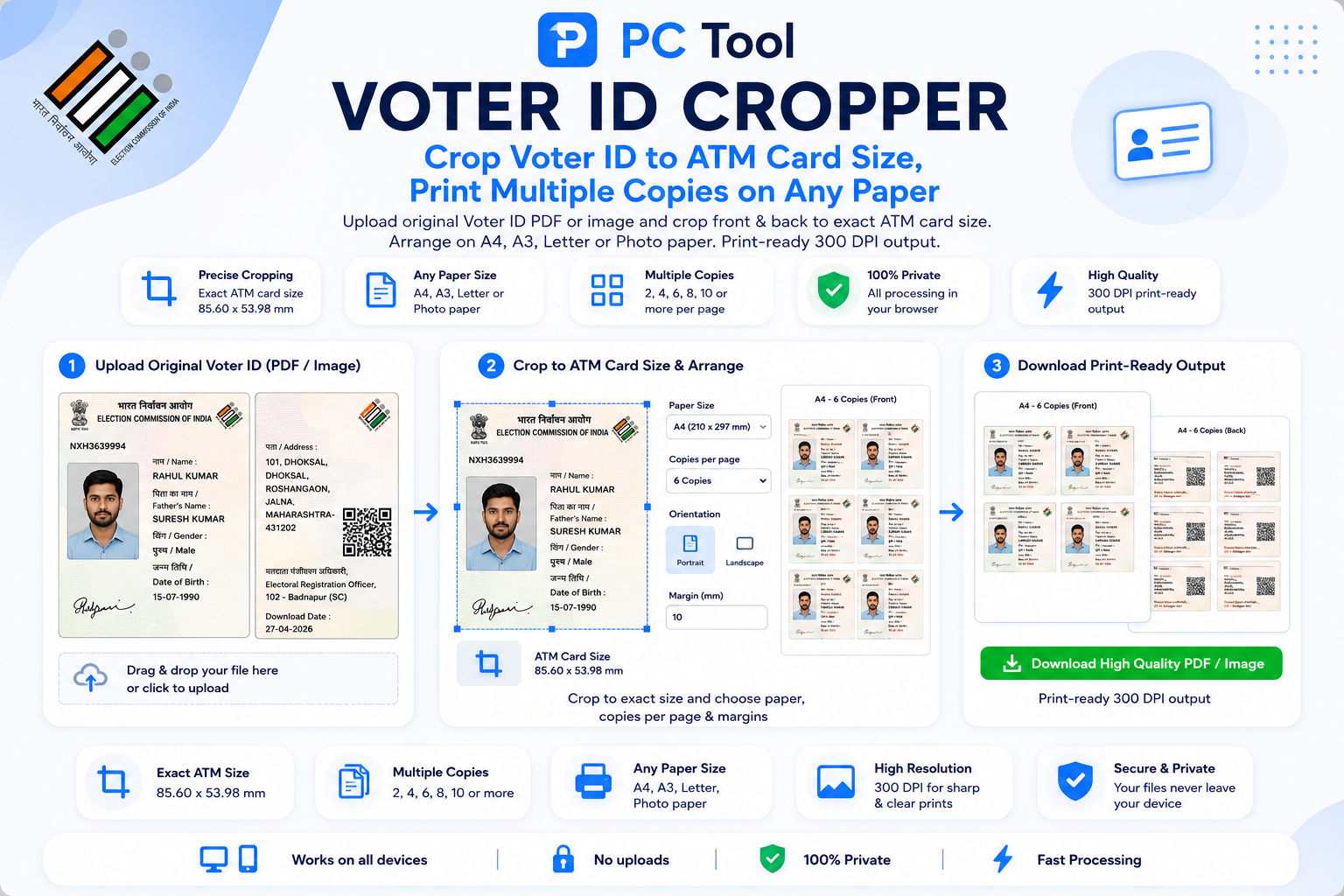
📌 What is Voter ID Card Cropper Online - Print Voter Card Front Back on A4?
Voter ID card (also called EPIC card or election card) is one of the most widely accepted identity proofs in India, required for KYC verification, address proof submission, government scheme applications, and election-related processes. The Election Commission of India provides the e-EPIC PDF download from the National Voters Service Portal (voters.eci.gov.in), and many citizens also have scanned copies or photos of their physical Voter ID card. Printing these clean, with the front and back arranged together, is a frequent need at CSC centres, photo studios, and for individual voters.
Our Voter Card Cropper tool processes both e-EPIC PDFs and scanned images automatically. Upload your file and the tool detects the Voter ID front and back, crops them with precision, and arranges them with a 5mm clean gap on your chosen paper size. The output is print-ready at 300 DPI — sharp enough for official submission, lamination, or use as a wallet-sized backup card.
The tool supports six paper sizes — A4 for normal printers, A3 for bulk printing, Letter for international standard, and photo paper sizes 4x6, 5x7, and 6x8 for direct printing at photo studios. Multiple copies can be placed on a single sheet, useful for CSC operators preparing applications for villagers and for families needing copies for all eligible voters.
This is a premium tool (3 coins per use) that handles e-EPIC PDF processing, automatic card detection, and high-resolution print output entirely in your browser. Your Voter ID image and PDF are never uploaded to any server, ensuring complete privacy.
❓ How to Use This Tool
Cropping and arranging your Voter ID for printing takes about thirty seconds. Here is the complete process.
Step 1: Upload Your Voter ID
Click the upload zone or drag and drop your file. Three input types are supported — a JPG or PNG photo of your Voter ID, a scanned image, or the e-EPIC PDF downloaded from the National Voters Service Portal (voters.eci.gov.in). Maximum file size is 20 MB.
Step 2: Handle Password (For e-EPIC PDFs)
If you uploaded a password-protected e-EPIC PDF, the tool detects this automatically. The password for e-EPIC is typically your EPIC number itself, or the password set during download from the portal. Enter the password in the field that appears.
Step 3: Choose Paper Size
Select the paper size you will print on. A4 (210x297 mm) is the most common for office and home printers. A3 is for bulk printing. Letter is the US standard. Photo paper sizes 4x6, 5x7, and 6x8 produce plastic-card-quality output at photo studios.
Step 4: Set Number of Copies
Use the plus and minus buttons to set how many copies you want. Each copy contains the Voter ID front and back with a 5mm gap. Set 1 for a single copy or up to 50 for bulk printing.
Step 5: Click Crop and Download
The tool processes your Voter ID at 300 DPI print resolution and generates a print-ready output.
Step 6: Print
Open the downloaded file and print at actual size. Use 100 GSM paper for normal prints or photo paper for premium card-quality results.
✓ Features & Benefits
- Auto-crops Voter ID front and back from e-EPIC PDF or scanned image
- Supports password-protected e-EPIC PDFs from National Voters Service Portal
- Six paper sizes: A4, A3, Letter, 4x6, 5x7, and 6x8 photo paper
- Multiple copies on one sheet — set from 1 to 50 copies
- Automatic 5mm gap between front and back for clean separation
- Print-ready 300 DPI output for sharp professional quality
- Works with photos, scans, and direct e-EPIC PDFs
- 100% browser-based — Voter ID data never leaves your device
- Works on mobile, tablet, and desktop with full touch support
- No watermark on output — clean print-ready result
💡 Tips for Best Results
For the cleanest crop, use the original e-EPIC PDF downloaded from voters.eci.gov.in. The PDF contains the Voter ID at the highest resolution and produces the sharpest print output.
The e-EPIC password depends on how you downloaded the file. If the password was set during download, use that. Otherwise, the EPIC number itself often works. The exact format is shown on the download confirmation page.
For CSC operators preparing copies for villagers during election season or KYC submissions, A4 with 4 to 6 copies per sheet is most efficient. Use 100 GSM paper for substantial-feeling prints.
For wallet-sized Voter ID cards, print at 4x6 photo paper size, then laminate. This produces a usable backup card to carry in your wallet for KYC verification at banks, airports, and government offices.
If your physical Voter ID is damaged, faded, or lost, you can apply for duplicate EPIC at voters.eci.gov.in. The cropped print from this tool serves as a temporary reference but does not replace the official replacement card.
Take phone photos of Voter ID in good light with the card flat. Tilted or shadowed photos produce poorly cropped results. A flatbed scanner gives the best output.
❔ Frequently Asked Questions
How do I crop a Voter ID card for printing?
Upload your Voter ID (image, scan, or e-EPIC PDF), enter the PDF password if needed, choose paper size and number of copies, then click Crop and Download. The print-ready file with front and back arranged neatly downloads automatically.
What is the password for the e-EPIC PDF?
The password depends on how you downloaded the e-EPIC. If you set a password during download, use that. Otherwise, the EPIC number itself often serves as the password. Check the download confirmation email or page from voters.eci.gov.in for the exact format.
What paper sizes can I print on?
Six sizes are supported — A4, A3, Letter, and photo paper sizes 4x6, 5x7, and 6x8. A4 is the most common for normal printers. Photo paper sizes give plastic-card-quality output when printed at photo studios.
How many copies can I print on a single sheet?
Up to 50 copies per sheet, depending on paper size. A4 typically holds 4 to 6 copies clearly. A3 holds 12 to 16 copies. Photo paper sizes hold 1 to 2 copies. The tool arranges copies efficiently to minimize wasted paper.
Can I use the printed Voter ID as my official card?
No. A printed copy is a photocopy for reference and KYC submission purposes only. The official Voter ID card must be obtained from the Election Commission of India through the duplicate EPIC service at voters.eci.gov.in.
Is my Voter ID uploaded to a server?
No. All processing — PDF password handling, cropping, and arrangement — runs inside your browser. Your Voter ID image, PDF, and password are never sent to any external server.
How many coins does this tool use?
This is a premium tool that uses 3 coins per use. The premium pricing covers e-EPIC PDF password handling, automatic card detection, and 300 DPI high-resolution print output.
📌 Voter ID Card Cropper ऑनलाइन - Voter Card Front Back A4 वर Print काय आहे?
Voter ID card (EPIC card किंवा election card) हे भारतातील सर्वात व्यापकपणे स्वीकारले जाणारे identity proof आहे — KYC verification, पत्ता पुरावा, सरकारी योजना अर्ज, आणि election-related प्रक्रियांसाठी आवश्यक. Election Commission of India च्या National Voters Service Portal (voters.eci.gov.in) वरून e-EPIC PDF download करता येते, आणि अनेक नागरिकांकडे physical Voter ID चे scanned copies किंवा फोटो असतात. हे स्वच्छ print करणे, front आणि back एकत्र arrange करून — CSC centres, photo studios, आणि सामान्य मतदारांची नियमित गरज आहे.
आमचे Voter Card Cropper टूल e-EPIC PDF आणि scanned images दोन्ही आपोआप process करते. File अपलोड करा, टूल Voter ID front आणि back detect करते, precisely crop करते, आणि निवडलेल्या paper size वर 5mm clean gap सह arrange करते. Output 300 DPI वर print-ready — official submission, lamination, किंवा wallet-sized backup card साठी sharp.
सहा paper sizes — normal printers साठी A4, bulk printing साठी A3, international standard साठी Letter, आणि photo studios मध्ये थेट print साठी photo paper sizes 4x6, 5x7, 6x8. एका sheet वर अनेक copies — CSC operators ना गावकऱ्यांसाठी अर्ज तयार करताना आणि कुटुंबातील सर्व eligible voters साठी copies हव्या असल्यास उपयुक्त.
हे premium टूल आहे (प्रत्येक वापरासाठी 3 coins) — e-EPIC PDF processing, automatic card detection, आणि high-resolution print output ब्राउझरमध्येच handle करते. Voter ID image आणि PDF कधीही कोणत्याही सर्व्हरवर पाठवले जात नाहीत.
❓ हे साधन कसे वापरावे
पायरी १: Voter ID अपलोड करा
File अपलोड करा — JPG, PNG फोटो, scanned image, किंवा National Voters Service Portal (voters.eci.gov.in) वरून download केलेले e-EPIC PDF. जास्तीत जास्त 20 MB.
पायरी २: Password टाका (e-EPIC PDF साठी)
Password-protected e-EPIC PDF अपलोड केल्यास टूल आपोआप detect करते. e-EPIC चा password साधारणपणे EPIC number स्वतः, किंवा portal वरून download करताना सेट केलेला password असतो. Field मध्ये password टाका.
पायरी ३: Paper Size निवडा
A4 (210x297 mm) — office आणि home printers साठी सर्वात सामान्य. A3 — bulk printing साठी. Letter — US standard. Photo paper sizes 4x6, 5x7, 6x8 — photo studios मध्ये plastic-card-quality output.
पायरी ४: Copies ची संख्या सेट करा
Plus आणि minus buttons वापरून copies निवडा. प्रत्येक copy मध्ये Voter ID front आणि back 5mm gap सह असतात. 1 ते 50 copies पर्यंत.
पायरी ५: Crop and Download दाबा
टूल 300 DPI print resolution वर Voter ID process करते आणि print-ready output तयार करते.
पायरी ६: Print करा
Downloaded file actual size वर print करा. Normal prints साठी 100 GSM paper, premium card-quality साठी photo paper.
✓ वैशिष्ट्ये आणि फायदे
- e-EPIC PDF किंवा scanned image मधून front-back आपोआप crop
- National Voters Service Portal चे password-protected e-EPIC PDF support
- सहा paper sizes: A4, A3, Letter, 4x6, 5x7, 6x8 photo paper
- एका sheet वर अनेक copies — 1 ते 50 पर्यंत
- Front आणि back मध्ये 5mm आपोआप gap
- Print-ready 300 DPI output — sharp professional quality
- फोटो, scans आणि थेट e-EPIC PDF सर्व चालतात
- १००% ब्राउझर-आधारित — Voter ID data सर्व्हरवर जात नाही
- Mobile, tablet, desktop सर्वत्र — पूर्ण touch support
- Output वर कोणताही watermark नाही
💡 सर्वोत्तम परिणामांसाठी टिपा
सर्वात स्वच्छ crop साठी voters.eci.gov.in वरून download केलेले मूळ e-EPIC PDF वापरा. PDF मध्ये highest resolution असते आणि sharpest print output मिळतो.
e-EPIC चा password कसा download केला त्यावर अवलंबून असतो. Download दरम्यान password सेट केला असल्यास तो वापरा. नाहीतर EPIC number स्वतः बहुधा काम करतो. Exact format download confirmation page वर दाखवला जातो.
CSC operators ना election season किंवा KYC submissions साठी गावकऱ्यांच्या copies तयार करताना A4 वर 4 ते 6 copies सर्वात efficient. Substantial-feeling prints साठी 100 GSM paper.
Wallet-sized Voter ID cards साठी 4x6 photo paper वर print करा, नंतर lamination करा. Banks, airports, सरकारी कार्यालयांमधील KYC verification साठी wallet मध्ये ठेवण्याजोगा backup card मिळतो.
Physical Voter ID damaged, faded किंवा lost असल्यास voters.eci.gov.in वर duplicate EPIC साठी अर्ज करता येतो. या टूलचे cropped print तात्पुरते reference म्हणून उपयुक्त, पण official replacement card replace करत नाही.
Voter ID चे phone photo चांगल्या प्रकाशात, कार्ड सपाट ठेवून काढा. Tilted किंवा shadowed फोटो पासून poorly cropped results येतात. Flatbed scanner सर्वोत्तम output देतो.
❔ वारंवार विचारले जाणारे प्रश्न
Voter ID card print साठी कसे crop करावे?
Voter ID (image, scan, किंवा e-EPIC PDF) अपलोड करा, PDF password असल्यास टाका, paper size आणि copies निवडा, आणि Crop and Download दाबा. Front आणि back neatly arrange केलेली print-ready file आपोआप download होते.
e-EPIC PDF चे password काय असते?
Password e-EPIC कसा download केला त्यावर अवलंबून असतो. Download दरम्यान password सेट केला असल्यास तो वापरा. नाहीतर EPIC number स्वतः बहुधा password म्हणून काम करतो. voters.eci.gov.in च्या download confirmation email किंवा page वर exact format तपासा.
कोणत्या paper sizes वर print करता येते?
सहा sizes — A4, A3, Letter, आणि photo paper sizes 4x6, 5x7, 6x8. A4 normal printers साठी सर्वात सामान्य. Photo paper sizes photo studios मध्ये plastic-card-quality output देतात.
एका sheet वर किती copies येतात?
Paper size नुसार 50 copies पर्यंत. A4 वर साधारण 4 ते 6 copies. A3 वर 12 ते 16 copies. Photo paper वर 1 ते 2 copies. टूल कागद वाचवण्यासाठी efficiently arrange करते.
Print केलेला Voter ID official card म्हणून वापरता येतो का?
नाही. Print केलेली copy फक्त संदर्भ आणि KYC submission साठी photocopy आहे. Official Voter ID card Election Commission of India च्या voters.eci.gov.in वरील duplicate EPIC service ने मिळवावा लागतो.
माझा Voter ID सर्व्हरवर जातो का?
नाही. PDF password handling, cropping, arrangement सर्व ब्राउझरमध्येच होते. Voter ID image, PDF आणि password external सर्व्हरवर पाठवले जात नाहीत.
या टूल साठी किती coins लागतात?
हे premium टूल आहे — प्रत्येक वापरासाठी 3 coins. e-EPIC PDF password handling, automatic card detection, आणि 300 DPI high-resolution print output यांना जास्त processing power लागते.