📌 What is Passport Size Photo Maker Online?
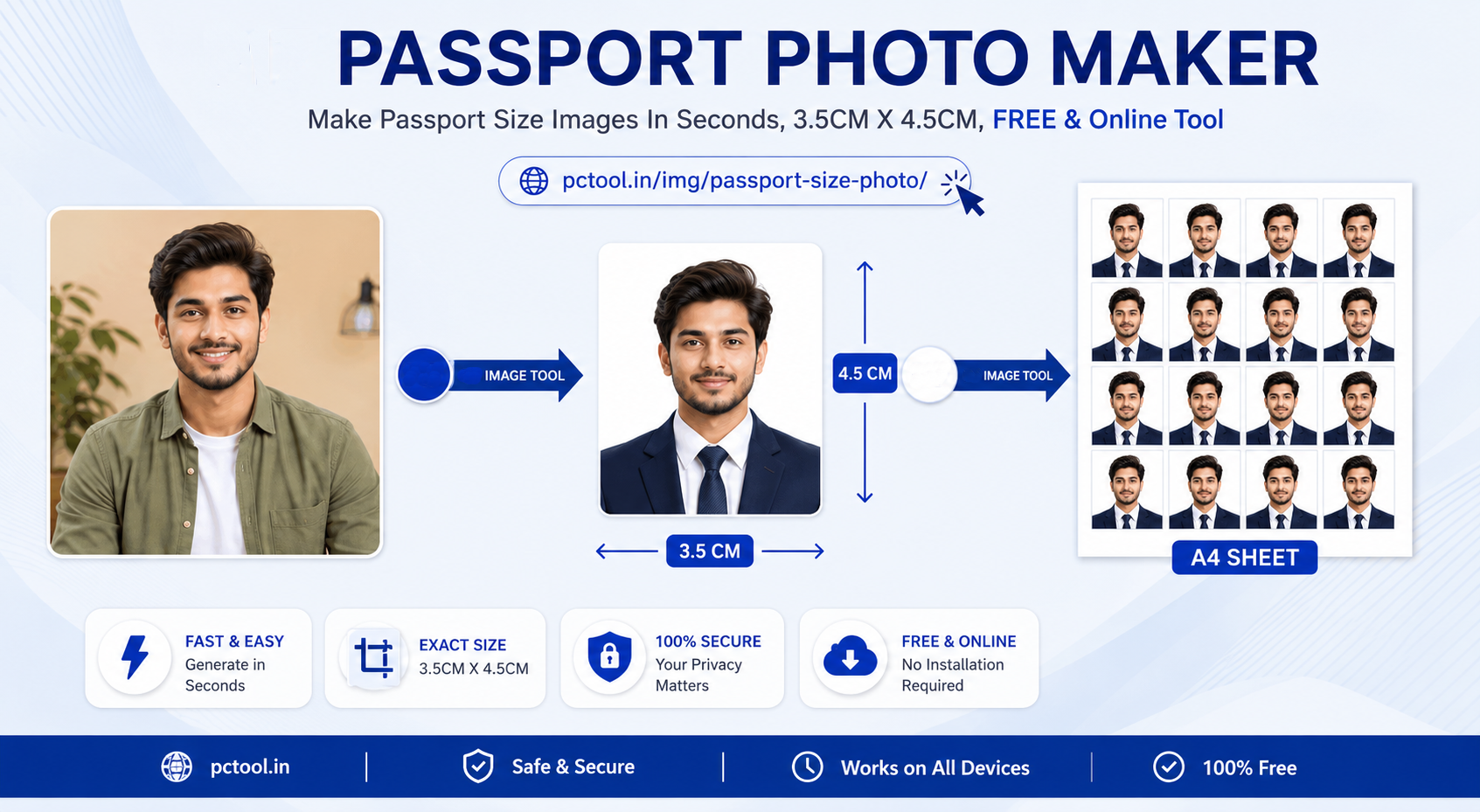
A passport size photo is a standardized photograph required for official documents such as passports, visas, ID cards, Aadhaar cards, PAN cards, driving licenses, and various government or private applications. Each country follows strict rules for photo size, background color, face positioning, and print quality. For example, India typically uses 3.5×4.5 cm (35×45 mm), the USA requires 2×2 inches, and many European countries follow 35×45 mm formats.
Our advanced online passport photo maker is not just a simple editing tool — it is a complete end-to-end passport photo creation and print layout system. It allows you to convert any normal photo into a fully compliant passport-size image within seconds. You simply upload your photo, and the system automatically removes the background using AI, adjusts brightness and contrast, crops the image to exact dimensions, and prepares it for official use.
The most powerful feature of our tool is its intelligent print layout engine. Instead of giving you just a single photo, it automatically arranges multiple copies on standard print sheets like 4×6 inch, 5×7 inch, A4, or A3. This means you can directly print and cut your photos without using any additional software. This feature is especially useful for CSC operators, VLEs, shop owners, and individuals who need bulk passport photos quickly and professionally.
Whether you are applying for a passport, visa, government job, school admission, or any identity card, this tool helps you save time, money, and effort by eliminating the need to visit a photo studio.
❓ How to Use This Tool
Creating passport-size photos is simple, fast, and user-friendly with our guided 4-step wizard.
Step 1: Upload Photo
Upload 1 to 3 photos using the upload slots. Our tool supports multiple formats including JPG, PNG, HEIC, and HEIF. You can process photos for multiple people at once, making it ideal for families, offices, or service centers.
Step 2: Select Size and Adjust
Choose your required passport photo size from the dropdown menu (India 3.5×4.5 cm, USA 2×2 inch, etc.) or enter custom dimensions. Use built-in crop tools to adjust the face position. You can drag, zoom, and rotate the image to ensure proper alignment. The live preview helps you see exactly how your final photo will appear.
Step 3: Background Removal and Enhancement
Select your preferred background color. White is standard for most passport and ID applications, but you can also choose red, blue, sky blue, or custom colors based on your needs. Our AI automatically removes the original background and replaces it instantly. You can also fine-tune brightness, contrast, and saturation for better quality.
Step 4: Print Layout and Download
Choose your paper size such as 4×6 inch, 5×7 inch, A4, or A3. Then select how many copies you want per person. Our smart layout engine automatically arranges the photos in a grid format with perfect spacing, margins, and exact dimensions. It maximizes the number of photos per sheet without distorting size accuracy.
Click "Generate Sheet" to create a high-resolution (300 DPI) print-ready file. Download it instantly and print using any home or office printer. For best results, always print at 100% scale (disable "fit to page"). The entire process takes less than 2 minutes and runs completely in your browser, ensuring 100% privacy and security.
✓ Features & Benefits
- Completely free to use - no hidden charges or watermarks
- AI-powered automatic background removal
- Supports 50+ country passport photo sizes
- Bulk processing - handle up to 3 people at once
- Smart print layout engine for automatic photo arrangement
- Multiple paper sizes supported: 4×6, 5×7, A4, A3
- High-resolution 300 DPI output for professional printing
- Advanced editing tools: brightness, contrast, saturation
- Real-time preview before download
- 100% privacy - all processing happens in your browser
- Works on mobile, tablet, and desktop devices
- No registration or login required
💡 Tips for Best Results
For best results, use a clear photo taken in good lighting conditions. Make sure your face is fully visible, centered, and free from shadows. The head should occupy about 70–80% of the frame. Avoid wearing glasses if they create glare, and maintain a neutral expression as required for most official documents.
Ensure the background is clean before uploading for better AI detection. Use the editing tools to improve brightness and contrast if needed. When printing, use high-quality photo paper (matte or glossy) for best results. Always print at actual size (100%) to maintain correct dimensions, as incorrect scaling may lead to rejection in official applications.
❔ Frequently Asked Questions
What is the standard passport photo size for India?
The standard size for Indian passport, Aadhaar, PAN card, and most government documents is 3.5 × 4.5 cm (35 × 45 mm). Our tool automatically applies this when you select India.
Can I use this tool for Aadhaar and PAN card photos?
Yes, this tool is fully suitable for Aadhaar, PAN card, voter ID, and other Indian documents. Just select the correct size and white background.
How does the print layout system work?
Our system automatically creates a print-ready sheet based on your selected paper size. It duplicates and arranges your photos in a grid layout with precise spacing and exact dimensions so you can directly print and cut them without any manual editing.
How many photos fit on a 4×6 sheet?
Depending on spacing and size, you can typically fit 8 to 12 passport photos (3.5×4.5 cm) on a single 4×6 inch sheet.
Is my photo uploaded to your server?
No. All processing happens inside your browser. Your photos are never uploaded or stored, ensuring complete privacy.
📌 पासपोर्ट आकार फोटो मेकर ऑनलाइन काय आहे?
पासपोर्ट आकाराचा फोटो हा पासपोर्ट, व्हिसा, आधार कार्ड, पॅन कार्ड, ड्रायव्हिंग लायसन्स आणि इतर सरकारी किंवा खासगी कागदपत्रांसाठी आवश्यक असलेला प्रमाणित फोटो आहे. प्रत्येक देशासाठी फोटोचा आकार, पार्श्वभूमी, चेहऱ्याची स्थिती आणि प्रिंट गुणवत्ता याबाबत विशिष्ट नियम असतात.
आमचे ऑनलाइन साधन हे फक्त फोटो एडिटर नाही, तर एक पूर्ण पासपोर्ट फोटो तयार करण्याची आणि प्रिंट करण्याची प्रणाली आहे. तुम्ही तुमचा साधा फोटो अपलोड केला की आमचे AI आपोआप पार्श्वभूमी काढते, योग्य आकारात क्रॉप करते आणि फोटो प्रिंटसाठी तयार करते.
यातील सर्वात महत्त्वाचे वैशिष्ट्य म्हणजे स्मार्ट प्रिंट लेआउट इंजिन. हे तुमचे अनेक फोटो ४×६, ५×७, A4 किंवा A3 शीटवर आपोआप योग्य ग्रिडमध्ये लावते. त्यामुळे तुम्हाला वेगळे सॉफ्टवेअर वापरण्याची गरज नाही. CSC ऑपरेटर, VLE, दुकान मालक आणि सामान्य वापरकर्त्यांसाठी हे खूप उपयुक्त आहे.
❓ हे साधन कसे वापरावे
पासपोर्ट फोटो तयार करणे खूप सोपे आहे.
पायरी १: फोटो अपलोड करा
१ ते ३ फोटो अपलोड करा. JPG, PNG, HEIC फॉरमॅट्स सपोर्ट आहेत.
पायरी २: साइज निवडा
भारत (३.५×४.५ सेमी) किंवा इतर देश निवडा. फोटो योग्यरित्या सेट करा.
पायरी ३: पार्श्वभूमी बदला
AI वापरून पार्श्वभूमी काढली जाते. पांढरा, निळा किंवा इतर रंग निवडा.
पायरी ४: प्रिंट लेआउट
पेपर साइज (४×६, A4) निवडा. फोटो आपोआप ग्रिडमध्ये लावले जातात. "Generate Sheet" करून डाउनलोड करा.
✓ वैशिष्ट्ये आणि फायदे
- पूर्णपणे मोफत वापर
- AI वापरून पार्श्वभूमी काढणे
- ५०+ देशांचे साइज सपोर्ट
- एकावेळी ३ फोटो प्रोसेस
- स्मार्ट प्रिंट लेआउट सिस्टम
- ४×६, A4, A3 शीट सपोर्ट
- उच्च गुणवत्ता 300 DPI आउटपुट
- मोबाइल आणि डेस्कटॉपवर कार्य करते
💡 सर्वोत्तम परिणामांसाठी टिपा
फोटो स्पष्ट आणि चांगल्या प्रकाशात काढा. चेहरा स्पष्ट दिसला पाहिजे. प्रिंट करताना १००% स्केल वापरा.
❔ वारंवार विचारले जाणारे प्रश्न
भारतासाठी पासपोर्ट फोटो साइज काय आहे?
३.५ × ४.५ सेमी हा मानक आकार आहे.
प्रिंट लेआउट कसे काम करते?
फोटो आपोआप शीटवर योग्य ग्रिडमध्ये लावले जातात.