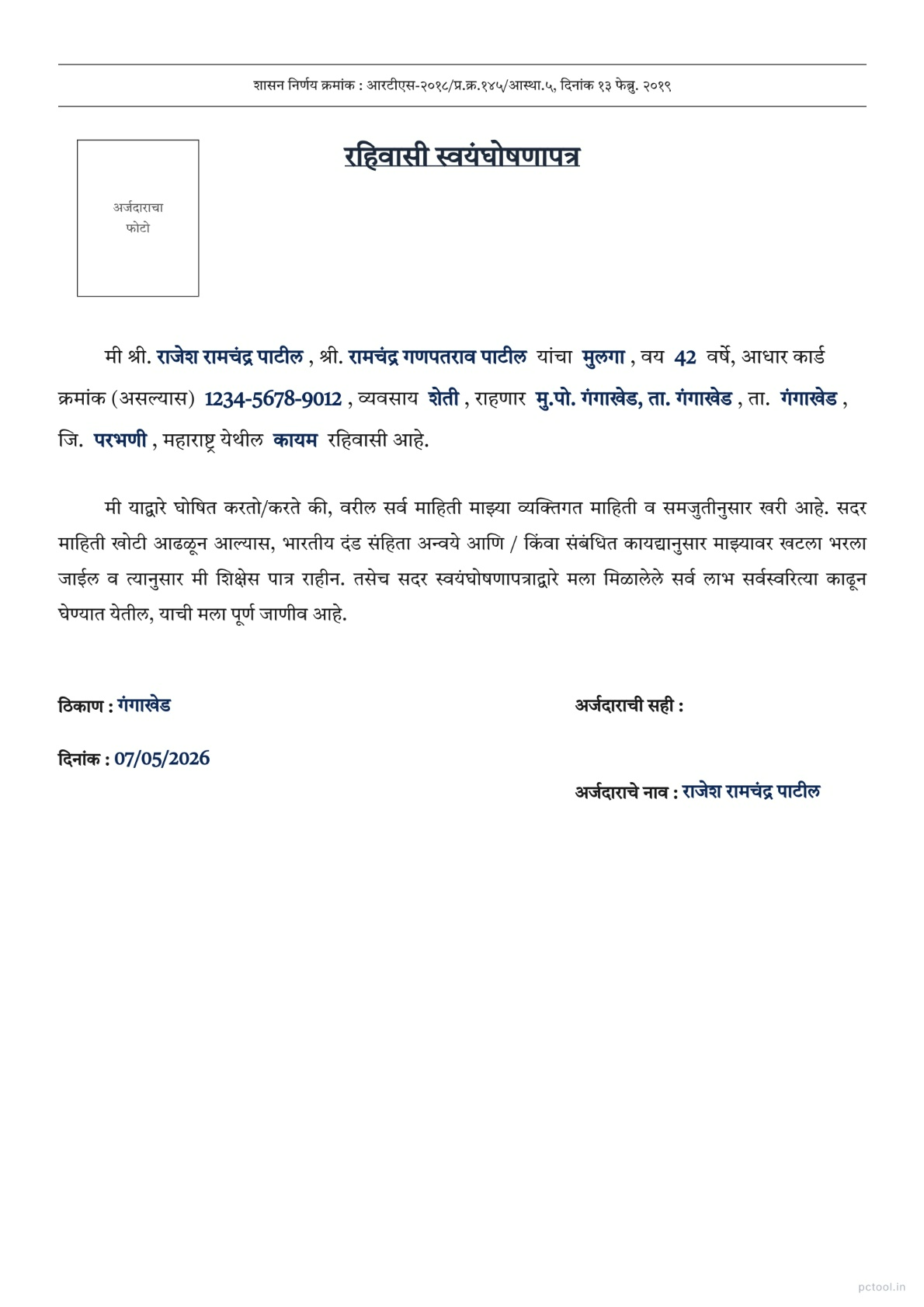
📌 What is Residence Self Declaration Letter Maharashtra Format - रहिवासी स्वयंघोषणापत्र?
A Residence Self-Declaration Letter (रहिवासी स्वयंघोषणापत्र) is one of the most commonly required identity documents across Maharashtra. It serves as proof of address when an applicant does not have a formal address proof such as Aadhaar, electricity bill, ration card, or rent agreement, or when the existing address proof shows a different address from where the person currently resides. The format is governed by the Maharashtra Government Resolution dated 13 February 2019 under the Right to Public Services Act, making this self-declaration valid for many government applications.
This declaration covers two types of residence — Permanent (कायम) for citizens who own or have long-term residence at the declared address, and Temporary (तात्पुरता) for those staying at the address for a limited time such as students in hostel accommodations, professionals on temporary postings, or migrant workers. The choice affects how the receiving authority processes the document.
The need for a Residence Declaration arises in countless practical situations. Domicile certificate applications at tahsildar offices, school and college admissions where address proof is required, government job applications and exam form submissions, scholarship applications by students whose Aadhaar shows a different address, voter ID address change requests, ration card additions, and various welfare scheme applications all require this document. CSC operators and VLE centres process dozens of these declarations daily for villagers and clients.
Our Residence Declaration Letter tool generates the exact official format used by Maharashtra Government offices. The format follows the structure mandated by the Government Resolution including the reference number, title, applicant details, address with taluka and district, residence type (permanent or temporary), occupation, photo placement, signature section, and date and place. Both Marathi and English versions are supported with a single click language toggle.
Fill in the form fields on the left and the preview updates live on the right. The official Tiro Devanagari Marathi font is used for proper Devanagari rendering. You can optionally upload and crop a passport-size photo. Download as a print-ready A4 PDF for printing, signing, and submitting at any government office, school, college, or CSC centre.
The tool is completely free with no watermark on the output. All processing happens in your browser — your personal information never leaves your device.
❓ How to Use This Tool
Generating a Residence Self-Declaration takes about a minute. Here is the complete process.
Step 1: Choose Language
Click Marathi or English at the top right. Marathi is required for Maharashtra Government offices. English is useful for central government applications, defence services, college admissions through CET, and any non-Marathi authority.
Step 2: Fill Applicant Information
Enter the applicant title (श्री., कु., श्रीम.), full name, parent or husband name with appropriate title, relation (son, daughter, or wife), age, occupation, and Aadhaar number if available.
Step 3: Fill Address Details
Enter the complete residence address, taluka, and district. This is the address you are declaring as your residence — it may differ from the address shown on your Aadhaar or other documents.
Step 4: Choose Residence Type
Select Permanent (कायम) if you own the property or have long-term residence at the address. Select Temporary (तात्पुरता) for short-term residence such as student hostel, rented PG, professional posting, or migrant work address. The receiving authority may apply different verification standards based on this choice.
Step 5: Set Date and Place
Enter the date of declaration and the place where the document is being signed.
Step 6: Upload Photo (Optional)
Click Upload Photo to add a passport-size photo. The crop tool lets you adjust zoom and rotation for a clean fit in the photo box.
Step 7: Review the Live Preview
Verify all details — names, address, taluka, district, residence type, and date — are correct.
Step 8: Download PDF
Click PDF Download to generate the print-ready A4 file. Print on standard A4 paper, sign in the designated signature area, and submit at the relevant office or portal.
✓ Features & Benefits
- Official Maharashtra Government format from GR dated 13 February 2019
- Permanent or Temporary residence type selection
- Marathi and English language toggle with one click
- Live preview — see the document update as you fill the form
- Authentic Tiro Devanagari Marathi font for proper Marathi rendering
- Optional passport photo upload with crop and rotation tools
- Pre-filled Government Resolution reference for legal validity
- Print-ready A4 PDF output suitable for any government office
- Free with no watermark on the output document
- 100% browser-based — personal data never leaves your device
💡 Tips for Best Results
When applying for a domicile certificate at the tahsildar office, the residence declaration must show at least 15 years of continuous residence in Maharashtra. The address declared should match the residence period claimed in the domicile application form.
For school and college admissions, address proof requirements vary by institution. For CET admissions and central university applications, the residence declaration may need to be submitted along with parent residence proof. Check the institution requirements before submitting.
For Permanent residence, the declared address should ideally match other documents like ration card, property tax receipt, or electricity bill. Mismatched permanent addresses across documents can cause verification issues.
For Temporary residence — common among students, IT professionals, and migrant workers — clearly mention the temporary nature in the form. The Temporary option in the dropdown is specifically for these cases. Some institutions accept temporary declarations only with a no-objection from the property owner.
When submitting along with other documents, keep the residence declaration on top so the verifying officer sees it first. This speeds up processing in busy offices.
For voter ID address change, this declaration is one of the documents accepted by the Election Commission online portal. Upload it along with a current address utility bill for fastest processing.
Always sign in blue or black ink only. Many government offices reject declarations with pencil or other coloured ink signatures.
❔ Frequently Asked Questions
What is a Residence Self-Declaration Letter?
It is an official document where a citizen declares in writing the address where they currently reside. Under Maharashtra Government Resolution dated 13 February 2019, this self-declaration is accepted as valid address proof for many government services where formal address proof such as Aadhaar or electricity bill is unavailable or shows a different address.
Where can I use this declaration?
Tahsildar offices for domicile certificate applications, schools and colleges for admission, government job applications, scholarship forms, voter ID address change requests, ration card additions, welfare scheme applications, and CSC portal submissions across Maharashtra all accept this declaration.
What is the difference between Permanent and Temporary residence?
Permanent residence applies when you own the property or have long-term residence at the declared address — used for citizens who have lived at the address for years. Temporary residence applies for short-term arrangements like student hostel, rented PG, professional posting, or migrant work. The receiving office may apply different verification standards based on this choice.
Is this valid for domicile certificate applications?
Yes, but the declared residence must reflect at least 15 years of continuous residence in Maharashtra for domicile certificate eligibility. The declaration alone is one supporting document — the tahsildar office may also require birth certificate, school certificates, or property documents proving the 15-year residence claim.
Is the format legally valid?
Yes. The format follows the official Maharashtra Government Resolution dated 13 February 2019 under the Right to Public Services Act. The pre-filled GR reference makes the document legally compliant for self-attestation purposes.
Can I generate this in English?
Yes. Click the English button at the top right to toggle the entire document to English. The English version is useful for central government applications, defence services, central university admissions through CET, and any non-Marathi authority. Marathi is the default and is preferred for Maharashtra state offices.
Is my information uploaded to a server?
No. All form processing, photo handling, and PDF generation happen entirely in your browser. Your personal details, photo, and address are never sent to any server. This makes the tool completely safe for sensitive personal information.
📌 रहिवासी स्वयंघोषणापत्र - Maharashtra Address Proof Format काय आहे?
रहिवासी स्वयंघोषणापत्र (Residence Self-Declaration Letter) हे महाराष्ट्रभर सर्वात नियमित आवश्यक असलेले identity documents पैकी एक आहे. आधार, वीज बिल, रेशन कार्ड, किंवा rent agreement सारखे formal address proof नसल्यास, किंवा existing address proof वर सध्याच्या निवासाहून वेगळा पत्ता असल्यास — हे document पत्त्याचा पुरावा म्हणून कार्य करते. Format महाराष्ट्र शासनाच्या १३ फेब्रुवारी २०१९ च्या शासन निर्णयाने Right to Public Services Act अंतर्गत governed आहे.
हे declaration दोन प्रकारच्या निवासांना cover करते — कायम (Permanent) — declared पत्त्यावर मालमत्ता असलेले किंवा long-term निवास असलेले नागरिक, आणि तात्पुरता (Temporary) — मर्यादित कालावधीसाठी राहणारे जसे hostel मध्ये राहणारे विद्यार्थी, तात्पुरत्या posting वर असलेले व्यावसायिक, किंवा migrant workers. ही निवड receiving authority ने document कसे process करायचे यावर परिणाम करते.
Residence Declaration ची गरज अनेक रोजच्या परिस्थितींमध्ये येते. तहसीलदार कार्यालयात domicile certificate अर्ज, address proof आवश्यक असलेले शाळा-कॉलेज प्रवेश, सरकारी नोकरी अर्ज आणि exam form submissions, आधारवर वेगळा पत्ता असलेल्या विद्यार्थ्यांचे शिष्यवृत्ती अर्ज, voter ID address change requests, रेशन कार्ड additions, आणि विविध welfare scheme अर्ज — सर्वांना हा document लागतो. CSC operators आणि VLE centres रोज गावकऱ्यांचे आणि ग्राहकांचे डझनभर declarations process करतात.
आमचे Residence Declaration Letter टूल महाराष्ट्र सरकारी कार्यालयांचा exact official format तयार करते. Format शासन निर्णयाने ठरवलेल्या structure नुसार — reference number, title, अर्जदाराची माहिती, तालुका आणि जिल्हा सह पत्ता, निवास प्रकार (कायम किंवा तात्पुरता), व्यवसाय, फोटो placement, सही विभाग, आणि दिनांक-ठिकाण. एका क्लिकवर मराठी आणि English दोन्ही.
डाव्या बाजूच्या form मध्ये माहिती भरा आणि उजव्या बाजूला live preview update होते. Devanagari rendering साठी official Tiro Devanagari Marathi font वापरला जातो. Passport-size फोटो upload आणि crop करण्याचा ऐच्छिक पर्याय. Print-ready A4 PDF download करा — कोणत्याही सरकारी कार्यालय, शाळा, कॉलेज, किंवा CSC centre मध्ये submission साठी.
टूल पूर्णपणे मोफत — output वर कोणताही watermark नाही. सर्व प्रक्रिया ब्राउझरमध्येच होते — वैयक्तिक माहिती कधीही device सोडत नाही.
❓ हे साधन कसे वापरावे
पायरी १: भाषा निवडा
उजव्या वरच्या कोपऱ्यातील मराठी किंवा English क्लिक करा. महाराष्ट्र सरकारी कार्यालयांसाठी मराठी आवश्यक. केंद्र सरकारी अर्ज, defence services, CET द्वारे कॉलेज प्रवेश, आणि कोणत्याही non-Marathi authority साठी English उपयुक्त.
पायरी २: अर्जदाराची माहिती भरा
पदवी (श्री., कु., श्रीम.), संपूर्ण नाव, वडिलांचे/पतीचे नाव योग्य पदवीसह, नाते (मुलगा, मुलगी, पत्नी), वय, व्यवसाय, आणि आधार क्रमांक (असल्यास).
पायरी ३: पत्ता भरा
संपूर्ण राहण्याचा पत्ता, तालुका, आणि जिल्हा. हाच पत्ता तुम्ही निवास म्हणून declare करत आहात — आधार किंवा इतर documents वरील पत्त्याहून वेगळा असू शकतो.
पायरी ४: निवास प्रकार निवडा
मालमत्ता तुमची असल्यास किंवा long-term निवास असल्यास कायम (Permanent) निवडा. Student hostel, rented PG, professional posting, किंवा migrant work address साठी तात्पुरता (Temporary) निवडा. Receiving authority ची verification standards या निवडीवर अवलंबून असू शकतात.
पायरी ५: दिनांक आणि ठिकाण सेट करा
Declaration ची तारीख आणि document सही करण्याचे ठिकाण टाका.
पायरी ६: फोटो अपलोड करा (ऐच्छिक)
Upload Photo क्लिक करून passport-size फोटो जोडा. Crop tool मध्ये zoom आणि rotation adjust करता येते.
पायरी ७: Live Preview तपासा
सर्व माहिती — नाव, पत्ता, तालुका, जिल्हा, निवास प्रकार, आणि दिनांक — बरोबर असल्याची खात्री करा.
पायरी ८: PDF Download करा
PDF Download क्लिक करून print-ready A4 file generate करा. Standard A4 paper वर print करा, designated signature area मध्ये सही करा, आणि संबंधित कार्यालय किंवा portal वर सादर करा.
✓ वैशिष्ट्ये आणि फायदे
- १३ फेब्रुवारी २०१९ च्या GR नुसार Maharashtra Government format
- Permanent किंवा Temporary निवास प्रकार निवड
- मराठी आणि English एका क्लिकमध्ये toggle
- Live preview — form भरताना document update
- Devanagari rendering साठी authentic Tiro Devanagari Marathi font
- Crop आणि rotation tools सह ऐच्छिक passport photo upload
- कायदेशीर validity साठी pre-filled GR reference
- कोणत्याही सरकारी कार्यालयासाठी योग्य print-ready A4 PDF
- मोफत — output वर कोणताही watermark नाही
- १००% ब्राउझर-आधारित — वैयक्तिक data सर्व्हरवर जात नाही
💡 सर्वोत्तम परिणामांसाठी टिपा
तहसीलदार कार्यालयात domicile certificate साठी अर्ज करताना residence declaration मध्ये महाराष्ट्रात किमान १५ वर्षांचा सलग निवास दाखवावा लागतो. Declared पत्ता domicile अर्ज form मधील दावा केलेल्या residence period शी match असावा.
शाळा-कॉलेज प्रवेशासाठी संस्थेनुसार address proof requirements वेगवेगळ्या असतात. CET प्रवेश आणि central university अर्जांसाठी residence declaration पालकांच्या residence proof सह सादर करावी लागू शकते. Submission आधी संस्थेच्या requirements तपासा.
Permanent residence साठी declared पत्ता रेशन कार्ड, property tax receipt, किंवा वीज बिलासारख्या इतर documents प्रमाणे match असावा. Documents मध्ये mismatched permanent पत्ते verification मध्ये issues कारणीभूत होतात.
Temporary residence साठी — विद्यार्थी, IT professionals, migrant workers यांच्यात सामान्य — form मध्ये temporary nature स्पष्ट नमूद करा. Dropdown मधील Temporary option specifically या cases साठी आहे. काही संस्था फक्त property owner च्या no-objection सह temporary declarations स्वीकारतात.
इतर documents सह सादर करताना residence declaration वर ठेवा — verifying officer ला आधी दिसते. हे व्यस्त कार्यालयांत processing जलद करते.
Voter ID address change साठी हे declaration Election Commission online portal स्वीकारते. जलद processing साठी current address utility bill सह upload करा.
नेहमी निळ्या किंवा काळ्या शाईने सही करा. अनेक सरकारी कार्यालये पेन्सिल किंवा इतर coloured ink सहीच्या declarations नाकारतात.
❔ वारंवार विचारले जाणारे प्रश्न
रहिवासी स्वयंघोषणापत्र म्हणजे काय?
हे official document आहे ज्यामध्ये नागरिक लिखित स्वरूपात सध्या राहत असलेला पत्ता declare करतो. १३ फेब्रुवारी २०१९ च्या Maharashtra Government Resolution अंतर्गत — आधार किंवा वीज बिलासारखे formal address proof उपलब्ध नसताना किंवा वेगळा पत्ता दर्शवत असताना अनेक सरकारी सेवांसाठी हे self-declaration valid address proof म्हणून स्वीकारले जाते.
हे declaration कुठे वापरता येते?
तहसीलदार कार्यालयात domicile certificate अर्जांसाठी, शाळा-कॉलेज प्रवेशांसाठी, सरकारी नोकरी अर्जांसाठी, शिष्यवृत्ती forms साठी, voter ID address change requests साठी, रेशन कार्ड additions साठी, welfare scheme अर्जांसाठी, आणि महाराष्ट्रभरील CSC portal submissions साठी हे declaration स्वीकारले जाते.
Permanent आणि Temporary निवास मध्ये काय फरक?
Permanent निवास — declared पत्त्यावर मालमत्ता असल्यास किंवा long-term निवास असल्यास — वर्षानुवर्षे त्या पत्त्यावर राहत असलेल्या नागरिकांसाठी. Temporary निवास — student hostel, rented PG, professional posting, किंवा migrant work साठी short-term arrangements. Receiving कार्यालय या निवडीवर वेगवेगळ्या verification standards लागू करू शकते.
Domicile certificate अर्जांसाठी valid आहे का?
होय, परंतु domicile certificate eligibility साठी declared निवास महाराष्ट्रात किमान १५ वर्षांचा सलग निवास दर्शवायला हवा. Declaration एकटे हे एक supporting document आहे — तहसीलदार कार्यालय जन्म प्रमाणपत्र, शाळा प्रमाणपत्रे, किंवा १५ वर्षांच्या निवासाचा पुरावा देणारी property documents देखील मागू शकते.
Format कायदेशीर valid आहे का?
होय. Format १३ फेब्रुवारी २०१९ च्या official Maharashtra Government Resolution नुसार आहे — Right to Public Services Act अंतर्गत. Pre-filled GR reference document ला self-attestation साठी कायदेशीर compliant बनवते.
English मध्ये generate करता येते का?
होय. उजव्या वरच्या कोपऱ्यातील English button क्लिक करा — संपूर्ण document English मध्ये toggle होते. केंद्र सरकारी अर्ज, defence services, CET द्वारे central university प्रवेश, आणि कोणत्याही non-Marathi authority साठी English उपयुक्त. महाराष्ट्र राज्य कार्यालयांसाठी मराठी default आणि preferred.
माझी माहिती सर्व्हरवर जाते का?
नाही. सर्व form processing, photo handling आणि PDF generation पूर्णपणे ब्राउझरमध्येच होते. वैयक्तिक माहिती, फोटो आणि पत्ता कोणत्याही सर्व्हरवर पाठवले जात नाहीत — संवेदनशील वैयक्तिक माहितीसाठी संपूर्ण safety.