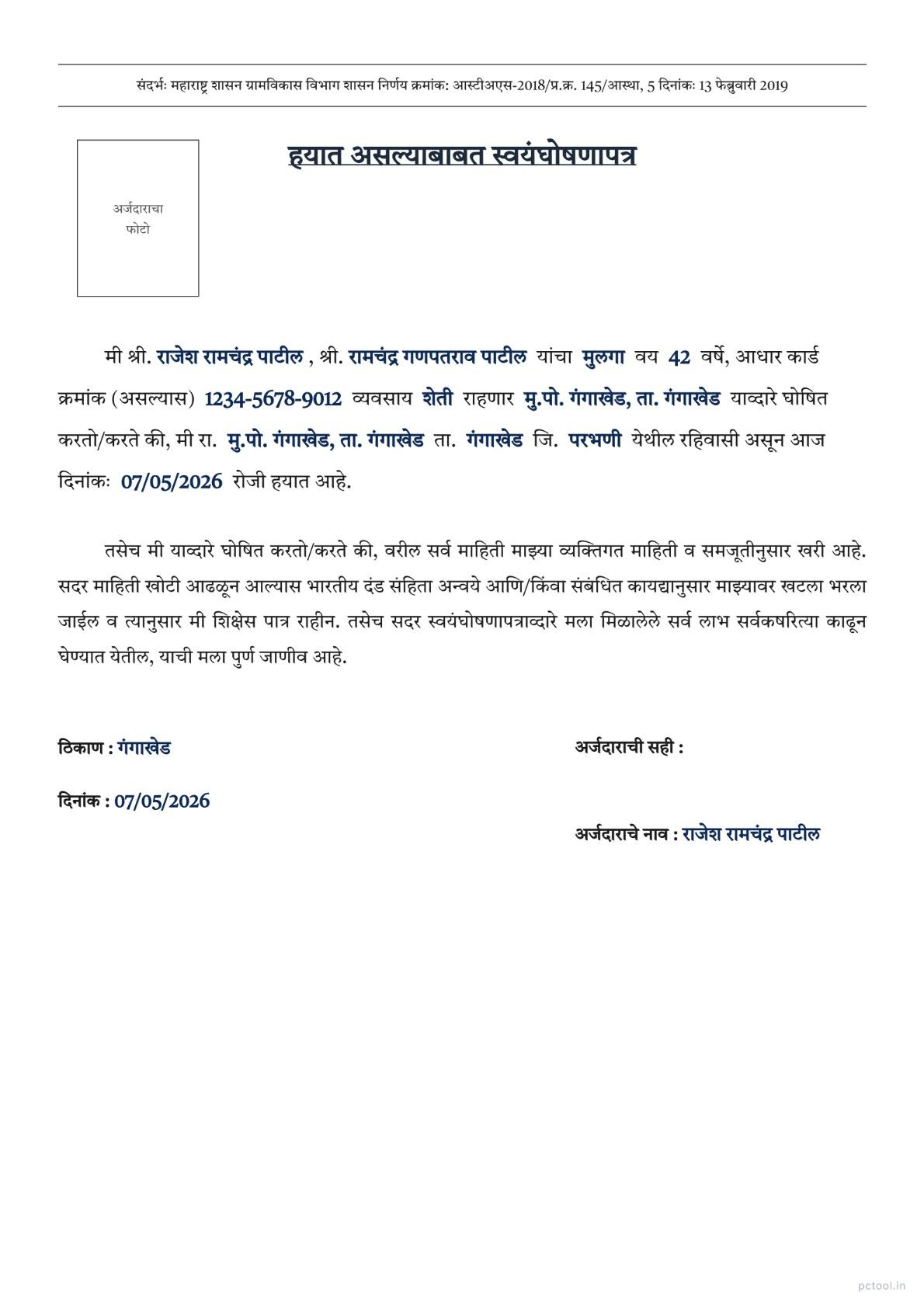
📌 What is Alive Self Declaration Letter Maharashtra Format - हयात असल्याबाबत स्वयंघोषणापत्र?
An Alive Self-Declaration Letter (हयात असल्याबाबत स्वयंघोषणापत्र), also called a Living Certificate or Life Certificate, is an official document where a citizen declares that they are alive and present at a stated address. The format is governed by the Maharashtra Government Resolution dated 13 February 2019 issued by the Rural Development Department under the Right to Public Services Act, making this self-declaration valid for many government applications without requiring multiple supporting documents.
This declaration is most frequently needed by pensioners, widows, retired government employees, ex-servicemen, and senior citizens for whom proof of being alive is required to continue receiving regular benefits. Pension departments, EPFO offices, banks managing pension accounts, treasury offices, and welfare scheme departments often require an Alive Declaration annually or whenever pension transfer, KYC update, or beneficiary verification is conducted. Without this document, pension payments can be temporarily suspended.
Beyond pension applications, this declaration is also required when an individual returns to a beneficiary list after being temporarily marked inactive, when there is a name mismatch between records suggesting the person may be deceased, when applying for revival of insurance policies, and when contesting wrongly recorded death entries in government databases.
Our Alive Declaration Letter tool generates the exact official format used by Maharashtra Government offices. The format follows the structure mandated by the Government Resolution including the reference to the Rural Development Department GR, the title, applicant details with relation, address with taluka and district, occupation, photo placement, signature section, and date and place fields. Both Marathi and English versions are supported with a single click language toggle.
Fill in the form fields on the left and the preview updates live on the right. The official Tiro Devanagari Marathi font is used for proper Devanagari rendering. You can optionally upload and crop a passport-size photo. Download as a print-ready A4 PDF for printing, signing, and submitting at any government office, bank, or pension department.
The tool is completely free with no watermark on the output. All processing happens in your browser — your personal information never leaves your device.
❓ How to Use This Tool
Generating an Alive Self-Declaration Letter takes about a minute. Here is the complete process.
Step 1: Choose Language
Click Marathi or English at the top right. Marathi is required for Maharashtra Government offices and treasury departments. English is useful for central government pension boards (CPAO, EPFO), defence pension departments, and banks managing your pension account.
Step 2: Fill Applicant Information
Enter the applicant title (श्री., कु., श्रीम.), full name, parent or husband name with appropriate title, relation (son, daughter, or wife), age, occupation, and Aadhaar number if available. Aadhaar adds extra credibility for KYC-related submissions.
Step 3: Fill Address Details
Enter the complete residence address, taluka, and district. The address should match your existing pension or banking records exactly. Address mismatches are a common reason for declaration rejection during verification.
Step 4: Set Date and Place
Enter the date of declaration and the place where the document is being signed. The date should be the current date or close to it — many pension departments require declarations to be signed within the last 30 days.
Step 5: Upload Photo (Optional)
Click Upload Photo to add a passport-size photo. The crop tool lets you adjust zoom and rotation. Many pension offices and banks require a recent photo on the declaration to confirm physical presence.
Step 6: Review the Live Preview
Verify all details — names, relation, address, and date — are correct. The Government Resolution reference and document title are pre-filled and automatically formatted.
Step 7: Download PDF
Click PDF Download to generate the print-ready A4 file. Print on standard A4 paper, sign in the designated signature area in front of a witness if your pension department requires it, and submit at the relevant office, bank branch, or upload to the digital pension portal.
✓ Features & Benefits
- Official Maharashtra Government format from Rural Development Dept GR dated 13 February 2019
- Designed for pensioners, widows, retired employees, ex-servicemen, and senior citizens
- Marathi and English language toggle with one click
- Live preview updates as you fill the form
- Authentic Tiro Devanagari Marathi font for proper Marathi rendering
- Optional passport photo upload with crop and rotation tools
- Pre-filled Government Resolution reference for legal validity
- Print-ready A4 PDF output suitable for pension offices, banks, and treasuries
- Free with no watermark on the output document
- 100% browser-based — personal data never leaves your device
💡 Tips for Best Results
For pension department submissions, sign the declaration in the presence of a gazetted officer, bank manager, or notary if your specific pension scheme requires witnessed declarations. Some defence and central pension departments specifically require this.
Use a recent passport-size photo (within the last 6 months) on the declaration. Old photos may be rejected during verification, especially if there is significant change in appearance.
Many pension departments now also accept Digital Life Certificate (Jeevan Pramaan) submitted through the government Jeevan Pramaan portal at jeevanpramaan.gov.in. Check with your pension office if a digital version is preferred over a printed declaration.
For widows submitting on behalf of family pension, the declaration must be signed by the widow herself. The relation field should be set to wife (पत्नी) and the parent/husband title should be set to late (कै.) for the deceased spouse.
The date on the declaration should be within the last 30 days of submission for most pension offices. Older declarations may be rejected and require re-submission.
Always keep a photocopy of the signed declaration with the submission acknowledgement receipt — pension offices sometimes lose documents and you may need to prove submission.
For ex-servicemen, the Alive Declaration is often required during annual pension verification at the Sainik Welfare Office. The format generated by this tool is accepted by both state and central defence pension authorities.
❔ Frequently Asked Questions
What is an Alive Self-Declaration Letter?
It is an official document where a citizen declares in writing that they are alive and present at a stated address. Under Maharashtra Government Resolution dated 13 February 2019 (Rural Development Department), this self-declaration is valid for pension verification, KYC updates, and many other government services.
Who needs this declaration?
Pensioners, widows receiving family pension, retired government employees, ex-servicemen, senior citizens receiving welfare benefits, and anyone whose continued status as living needs to be verified for receiving government payments. It is most commonly required during annual pension verification.
Can I use this for digital pension portals?
Yes. Most digital pension portals including state treasuries, EPFO, and many banks accept this format as an uploaded PDF. However, some central schemes prefer the Digital Life Certificate (Jeevan Pramaan) submitted via biometric authentication at jeevanpramaan.gov.in. Check with your specific pension office.
How recent should the declaration be?
Most pension offices require the declaration to be signed within the last 30 days of submission. The date field in the form should be the current date or recent. Older declarations may be rejected during verification.
Is this legally valid?
Yes. The format is based on the official Maharashtra Government Resolution dated 13 February 2019 issued by the Rural Development Department under the Right to Public Services Act. The pre-filled GR reference makes the document legally compliant for self-attestation purposes.
Do I need a witness or notary?
For most simple pension submissions, no. However, certain defence pension departments, central government schemes, and large-value benefits may require witnessed signatures by a gazetted officer, bank manager, or notary. Check with your specific pension office or scheme.
Is my personal data safe?
Yes. All form processing, photo handling, and PDF generation happen entirely in your browser. Your personal details, photo, and address are never transmitted to any server. This makes the tool completely safe for sensitive pension and identity information.
📌 हयात असल्याबाबत स्वयंघोषणापत्र - Maharashtra Pension Format काय आहे?
हयात असल्याबाबत स्वयंघोषणापत्र (Alive Self-Declaration Letter, Living Certificate, किंवा Life Certificate) हे official document आहे ज्यामध्ये नागरिक declare करतो की तो हयात आहे आणि नमूद केलेल्या पत्त्यावर उपस्थित आहे. हा format महाराष्ट्र शासनाच्या ग्रामविकास विभागाने १३ फेब्रुवारी २०१९ रोजी जारी केलेल्या शासन निर्णयाने Right to Public Services Act अंतर्गत governed आहे — ज्यामुळे अनेक supporting documents शिवाय हे self-declaration अनेक सरकारी अर्जांसाठी valid आहे.
हे declaration सर्वात जास्त pensioners, विधवा, सेवानिवृत्त सरकारी कर्मचारी, माजी सैनिक, आणि ज्येष्ठ नागरिक यांना लागते — ज्यांना नियमित benefits मिळवण्यासाठी हयात असल्याचा पुरावा आवश्यक असतो. Pension departments, EPFO कार्यालये, pension accounts manage करणाऱ्या बँका, treasury कार्यालये, आणि welfare scheme विभाग — pension transfer, KYC update, किंवा beneficiary verification करताना दरवर्षी Alive Declaration मागतात. हा document नसल्यास pension payments तात्पुरते थांबू शकतात.
Pension अर्जांशिवाय हे declaration इतर वेळीही आवश्यक — beneficiary list वर तात्पुरते inactive marked असलेली व्यक्ती परत active करताना, records मध्ये name mismatch मुळे व्यक्ती deceased असल्याचा संशय असल्यास, insurance policy revival साठी, आणि सरकारी databases मध्ये चुकून recorded death entries challenge करताना.
आमचे Alive Declaration Letter टूल महाराष्ट्र सरकारी कार्यालयांचा exact official format तयार करते. Format शासन निर्णयाने ठरवलेल्या structure नुसार — Rural Development Department GR reference, title, अर्जदाराची माहिती नाते सह, तालुका आणि जिल्हा सह पत्ता, व्यवसाय, फोटो placement, सही विभाग, आणि दिनांक-ठिकाण fields. एका क्लिकवर मराठी आणि English दोन्ही.
डाव्या बाजूच्या form मध्ये माहिती भरा आणि उजव्या बाजूला live preview update होते. Devanagari rendering साठी official Tiro Devanagari Marathi font वापरला जातो. Passport-size फोटो upload आणि crop करण्याचा ऐच्छिक पर्याय. Print-ready A4 PDF download करा — सरकारी कार्यालय, बँक, किंवा pension विभागात submission साठी.
टूल पूर्णपणे मोफत — output वर कोणताही watermark नाही. सर्व प्रक्रिया ब्राउझरमध्येच होते — वैयक्तिक माहिती कधीही device सोडत नाही.
❓ हे साधन कसे वापरावे
पायरी १: भाषा निवडा
उजव्या वरच्या कोपऱ्यातील मराठी किंवा English क्लिक करा. महाराष्ट्र सरकारी कार्यालये आणि treasury विभागांसाठी मराठी आवश्यक. केंद्र सरकारी pension boards (CPAO, EPFO), defence pension विभाग, आणि pension account manage करणाऱ्या बँकांसाठी English उपयुक्त.
पायरी २: अर्जदाराची माहिती भरा
पदवी (श्री., कु., श्रीम.), संपूर्ण नाव, वडिलांचे/पतीचे नाव योग्य पदवीसह, नाते (मुलगा, मुलगी, पत्नी), वय, व्यवसाय, आणि आधार क्रमांक (असल्यास). KYC-related submissions साठी आधार extra credibility देते.
पायरी ३: पत्ता भरा
संपूर्ण राहण्याचा पत्ता, तालुका, आणि जिल्हा. पत्ता विद्यमान pension किंवा banking records प्रमाणे exactly match असावा. Address mismatch declaration rejection चे सामान्य कारण आहे.
पायरी ४: दिनांक आणि ठिकाण सेट करा
Declaration ची तारीख आणि document सही करण्याचे ठिकाण टाका. तारीख वर्तमान किंवा अलीकडची असावी — अनेक pension विभाग ३० दिवसांच्या आत signed declarations मागतात.
पायरी ५: फोटो अपलोड करा (ऐच्छिक)
Upload Photo क्लिक करून passport-size फोटो जोडा. Crop tool मध्ये zoom आणि rotation. अनेक pension कार्यालये आणि बँका physical presence confirm करण्यासाठी अलीकडचा फोटो मागतात.
पायरी ६: Live Preview तपासा
सर्व माहिती — नाव, नाते, पत्ता, आणि दिनांक — बरोबर असल्याची खात्री करा. GR reference आणि document title pre-filled आणि automatically formatted आहेत.
पायरी ७: PDF Download करा
PDF Download क्लिक करून print-ready A4 file generate करा. Standard A4 paper वर print करा, pension विभागाला witness आवश्यक असल्यास witness समोर सही करा, आणि संबंधित कार्यालय, बँक branch, किंवा digital pension portal वर सादर करा.
✓ वैशिष्ट्ये आणि फायदे
- १३ फेब्रुवारी २०१९ च्या ग्रामविकास विभाग GR नुसार Maharashtra Government format
- Pensioners, विधवा, सेवानिवृत्त कर्मचारी, माजी सैनिक, ज्येष्ठ नागरिकांसाठी designed
- मराठी आणि English एका क्लिकमध्ये toggle
- Live preview — form भरताना document update
- Devanagari rendering साठी authentic Tiro Devanagari Marathi font
- Crop आणि rotation tools सह ऐच्छिक passport photo upload
- कायदेशीर validity साठी pre-filled GR reference
- Pension कार्यालये, बँका, treasuries साठी योग्य print-ready A4 PDF
- मोफत — output वर कोणताही watermark नाही
- १००% ब्राउझर-आधारित — वैयक्तिक data सर्व्हरवर जात नाही
💡 सर्वोत्तम परिणामांसाठी टिपा
Pension विभाग submission साठी, specific pension scheme ला witnessed declaration आवश्यक असल्यास gazetted officer, बँक manager, किंवा notary यांच्या उपस्थितीत declaration वर सही करा. काही defence आणि central pension विभाग हे specifically मागतात.
Declaration वर अलीकडचा passport-size फोटो (गेल्या ६ महिन्यांत काढलेला) वापरा. जुने फोटो verification मध्ये reject होऊ शकतात — विशेषतः appearance मध्ये लक्षणीय बदल असल्यास.
अनेक pension विभाग आता jeevanpramaan.gov.in वर government Jeevan Pramaan portal मार्फत Digital Life Certificate देखील स्वीकारतात. Printed declaration ऐवजी digital version preferred आहे का हे तुमच्या pension कार्यालयाशी तपासा.
Family pension साठी विधवा सादर करताना declaration वर स्वतः विधवेची सही असावी. नाते field "पत्नी" आणि वडिलांचे/पतीचे पदवी "कै." (deceased spouse साठी) सेट करा.
Declaration वरील दिनांक submission च्या ३० दिवसांच्या आत असावी. जुनी declarations बहुतेक pension कार्यालयांत reject होतात आणि re-submission लागते.
Signed declaration ची photocopy submission acknowledgement receipt सह नेहमी ठेवा — pension कार्यालये कधी कधी documents गहाळ करतात आणि submission proof लागू शकतो.
माजी सैनिकांसाठी Sainik Welfare Office मध्ये वार्षिक pension verification दरम्यान Alive Declaration नियमित आवश्यक. या टूलने generate केलेला format राज्य आणि केंद्र दोन्ही defence pension authorities स्वीकारतात.
❔ वारंवार विचारले जाणारे प्रश्न
हयात असल्याबाबत स्वयंघोषणापत्र म्हणजे काय?
हे official document आहे ज्यामध्ये नागरिक लिखित स्वरूपात declare करतो की तो हयात आहे आणि नमूद केलेल्या पत्त्यावर उपस्थित आहे. १३ फेब्रुवारी २०१९ च्या Maharashtra Government Resolution (ग्रामविकास विभाग) अंतर्गत — pension verification, KYC updates, आणि अनेक इतर सरकारी सेवांसाठी हे self-declaration valid आहे.
हे declaration कोणाला आवश्यक असते?
Pensioners, family pension मिळणाऱ्या विधवा, सेवानिवृत्त सरकारी कर्मचारी, माजी सैनिक, welfare benefits मिळणारे ज्येष्ठ नागरिक, आणि सरकारी payments मिळवण्यासाठी जिवंत असल्याची verification आवश्यक असलेले सर्व. वार्षिक pension verification दरम्यान सर्वात सामान्य.
Digital pension portals साठी हे वापरता येते का?
होय. राज्य treasuries, EPFO, आणि अनेक बँकांसह बहुतेक digital pension portals हा format uploaded PDF म्हणून स्वीकारतात. मात्र काही central schemes jeevanpramaan.gov.in वर biometric authentication ने Digital Life Certificate (Jeevan Pramaan) prefer करतात. तुमच्या specific pension कार्यालयाशी तपासा.
Declaration किती अलीकडची असावी?
बहुतेक pension कार्यालये submission च्या ३० दिवसांच्या आत signed declaration मागतात. Form मधील दिनांक field वर्तमान किंवा अलीकडची तारीख असावी. जुनी declarations verification मध्ये reject होऊ शकतात.
हा कायदेशीर valid आहे का?
होय. Format १३ फेब्रुवारी २०१९ च्या official Maharashtra Government Resolution (ग्रामविकास विभाग) नुसार आहे — Right to Public Services Act अंतर्गत. Pre-filled GR reference document ला self-attestation साठी कायदेशीर compliant बनवते.
Witness किंवा notary आवश्यक आहे का?
बहुतेक साध्या pension submissions साठी नाही. मात्र काही defence pension विभाग, केंद्र सरकारी schemes, आणि large-value benefits यांना gazetted officer, बँक manager, किंवा notary यांची witnessed signature लागू शकते. तुमच्या specific pension कार्यालयाशी किंवा scheme सह तपासा.
माझी वैयक्तिक data सुरक्षित आहे का?
होय. सर्व form processing, photo handling आणि PDF generation पूर्णपणे ब्राउझरमध्येच होते. वैयक्तिक माहिती, फोटो आणि पत्ता कोणत्याही सर्व्हरवर पाठवले जात नाहीत — संवेदनशील pension आणि identity माहितीसाठी संपूर्ण safety.