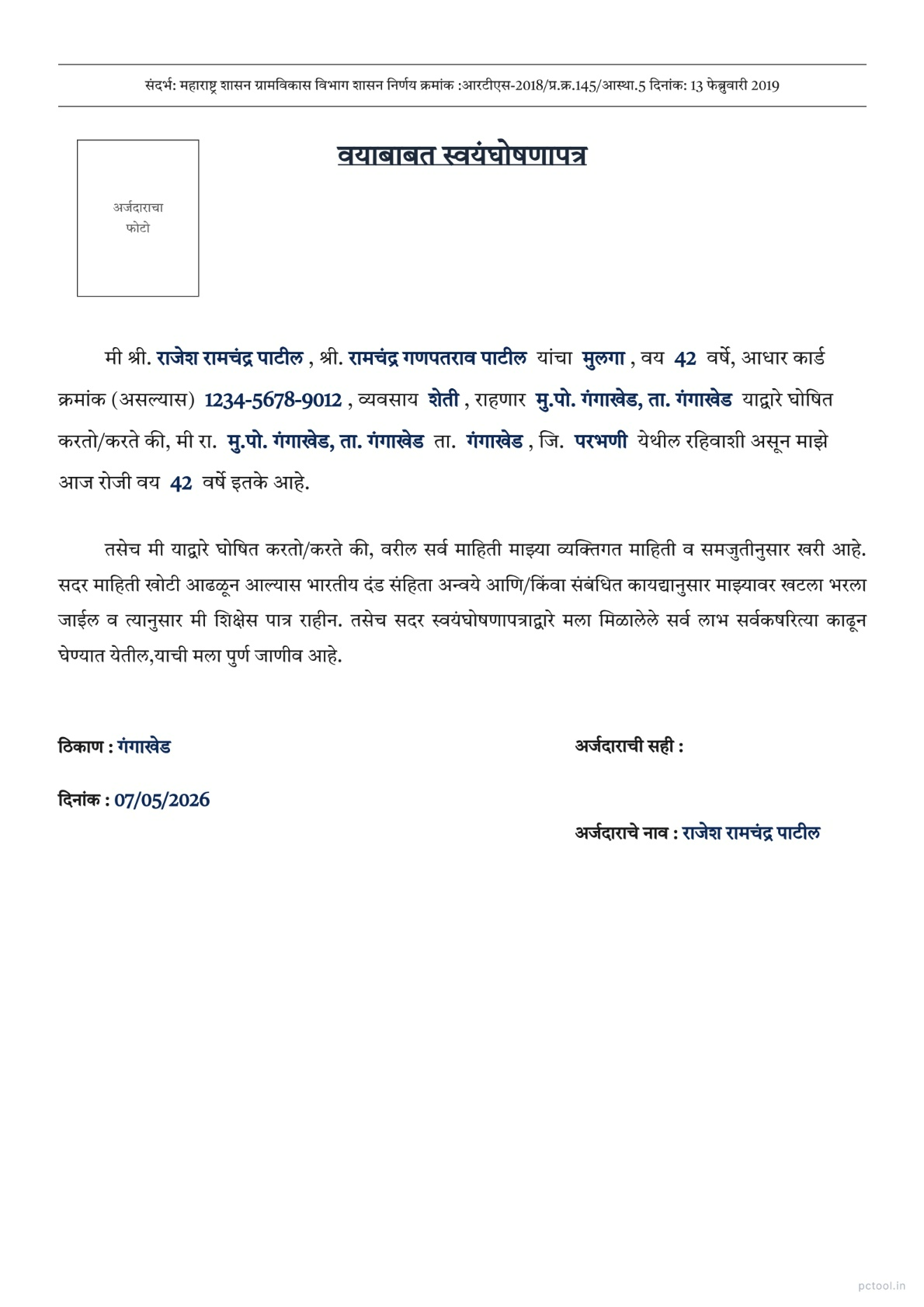
📌 What is Age Self Declaration Letter Maharashtra Format - वयाबाबत स्वयंघोषणापत्र?
An Age Self-Declaration Letter (वयाबाबत स्वयंघोषणापत्र) is an official document used across Maharashtra to declare a citizen age when an Aadhaar card, birth certificate, school leaving certificate, or other age proof is unavailable or being applied for. The format is governed by the Maharashtra Government Resolution dated 13 February 2019 (आरटीएस-२०१८/प्र.क्र.१४५/आस्था.५) under the Right to Public Services Act, which made self-declaration valid in place of multiple supporting documents for many government applications.
This declaration is required in numerous everyday situations. Citizens applying for age proof certificate at the tahsildar office, students enrolling in schools or colleges without a birth certificate, applicants for senior citizen benefits, widows applying for pension schemes, applicants for disability and welfare schemes, and individuals attending interviews for government jobs all need to submit a properly formatted Age Self-Declaration. The document carries legal weight under Section 4 of the Right to Public Services Act and false information is punishable.
Our Age Declaration Letter tool generates the exact official format used by Maharashtra Government offices. The format follows the structure mandated by the Government Resolution — including the reference number, title, applicant details, declared age, address with taluka and district, occupation, photo placement, signature section, and date and place fields. Both Marathi and English versions are supported with a single click language toggle.
Fill in the form fields on the left and watch the preview update live on the right. The tool uses the official Marathi font Tiro Devanagari Marathi for proper Devanagari rendering. You can optionally upload and crop a passport-size photo, which appears in the standard photo box at the top right of the document. When ready, download as a print-ready A4 PDF that you can print, sign, and submit at any government office or CSC centre.
This tool is completely free with no watermark on the output. All data is processed in your browser — your personal information never leaves your device.
❓ How to Use This Tool
Generating an Age Self-Declaration Letter takes about a minute. Here is the complete process.
Step 1: Choose Language
Click the Marathi or English button at the top right. Marathi is the default and is required for most Maharashtra Government offices. English is useful when submitting to central government departments or non-Marathi-speaking authorities.
Step 2: Fill Applicant Information
Enter the applicant title (श्री., कु., श्रीम.), full name, parent or husband name with appropriate title, relation (son, daughter, or wife), age, occupation, and Aadhaar number if available. Aadhaar is optional but recommended for stronger legal validity.
Step 3: Fill Address Details
Enter the complete residence address, taluka, and district. The address should match other identity documents such as Aadhaar, ration card, or voter ID for verification consistency.
Step 4: Set Date and Place
Enter the date of declaration and the place where the document is being signed. The place is typically the village, town, or city where the applicant resides.
Step 5: Upload Photo (Optional)
Click Upload Photo to add a passport-size photo of the applicant. The crop tool lets you adjust zoom and rotation for a clean fit in the photo box. The photo is optional but commonly required for many official submissions.
Step 6: Review the Live Preview
The right side shows the A4 preview updating live as you fill the form. Verify all details are correct — names, dates, addresses, and the declared age. The official format and reference number are pre-filled and cannot be changed.
Step 7: Download PDF
Click PDF Download at the top right. The tool generates a print-ready A4 PDF with all your information formatted as per the official Maharashtra format. Print on standard A4 paper, sign in the designated signature area, and submit at the relevant office or portal.
✓ Features & Benefits
- Official Maharashtra Government format from GR dated 13 February 2019
- Marathi and English language toggle with one click
- Live preview — see the document update as you fill the form
- Authentic Tiro Devanagari Marathi font for proper Marathi rendering
- Optional passport photo upload with crop and rotation tools
- Pre-filled Government Resolution reference for legal validity
- Print-ready A4 PDF output suitable for any government office
- Free with no watermark on the output document
- 100% browser-based — personal data never leaves your device
- Works on mobile, tablet, and desktop without any app install
💡 Tips for Best Results
For maximum acceptance at government offices, fill the address exactly as it appears on your Aadhaar card or ration card. Inconsistent addresses across documents can cause verification delays.
The age declared in this letter must match other identity documents you submit alongside. If your Aadhaar shows a slightly different age, the office may ask for clarification — in such cases declare the age as per Aadhaar.
For senior citizen applications, mentioning the exact age (and not just senior citizen status) is important because pension and welfare schemes have different age slabs (60+, 65+, 70+, 80+).
Always sign the document in the designated signature area in blue or black ink only. Pencil signatures are not accepted by most government offices. Do not sign on a printed signature line — sign just above or on the line.
Keep at least two copies of the signed declaration — submit one to the office and retain one for your records. Some offices may require an additional notarized copy for high-value claims like property transfers.
The declaration is valid as a self-attestation under Maharashtra Right to Public Services Act, but for certain legal proceedings or court submissions, a notarized version on stamp paper may be required. Check with the receiving office about their specific requirements.
❔ Frequently Asked Questions
What is an Age Self-Declaration Letter?
An Age Self-Declaration is an official document where you declare your age in writing. Under Maharashtra Government Resolution dated 13 February 2019, this self-declaration is accepted as valid age proof for many government services where a birth certificate or other age document is unavailable.
Where can I use this declaration letter?
It is accepted at tahsildar offices for age proof certificates, schools and colleges for admission without birth certificate, senior citizen pension applications, widow pension schemes, disability welfare applications, government job interviews, and many other CSC and government portal submissions across Maharashtra.
Is this format legally valid?
Yes. The format follows the official Maharashtra Government Resolution dated 13 February 2019 (reference आरटीएस-२०१८/प्र.क्र.१४५/आस्था.५) under the Right to Public Services Act. The pre-filled GR reference makes the document legally compliant for self-attestation purposes.
Do I need to print this on stamp paper?
No. For most government applications, plain A4 paper is sufficient. Stamp paper or notarization is only required for specific legal proceedings, court submissions, or property-related declarations. Check with the receiving office about their specific requirement.
Can I generate this in English?
Yes. Click the English button at the top right to toggle the entire document to English. The English version is useful when submitting to central government departments, defence services, or any non-Marathi authority. Marathi is the default and is preferred for most Maharashtra Government offices.
Is the photo mandatory?
The photo is optional in the tool. However, many offices require a passport-size photo affixed to the declaration. Check the requirement of the office you are submitting to. The tool lets you upload, crop, and rotate the photo before generating the PDF.
Is my information uploaded to a server?
No. All form processing, photo handling, and PDF generation happen entirely in your browser. Your personal details, photo, and address are never sent to any server. This makes the tool completely safe for sensitive personal information.
📌 वयाबाबत स्वयंघोषणापत्र - Maharashtra Government Format काय आहे?
वयाबाबत स्वयंघोषणापत्र (Age Self-Declaration Letter) हे महाराष्ट्रभर वापरले जाणारे official document आहे — आधार, जन्म प्रमाणपत्र, शाळा सोडल्याचा दाखला, किंवा वयाचा इतर पुरावा उपलब्ध नसताना नागरिकाने आपले वय declare करण्यासाठी वापरले जाते. हा format महाराष्ट्र शासनाच्या १३ फेब्रुवारी २०१९ च्या शासन निर्णयाने (आरटीएस-२०१८/प्र.क्र.१४५/आस्था.५) Right to Public Services Act अंतर्गत governed आहे — ज्यामुळे अनेक सरकारी अर्जांसाठी self-declaration अनेक supporting documents च्या जागी valid मानले जाते.
हे declaration अनेक रोजच्या परिस्थितींमध्ये आवश्यक असते. तहसीलदार कार्यालयात age proof certificate साठी अर्ज करणारे नागरिक, जन्म प्रमाणपत्राशिवाय शाळा-कॉलेज प्रवेश घेणारे विद्यार्थी, ज्येष्ठ नागरिक योजनांसाठी अर्जदार, विधवा pension साठी अर्जदार, अपंगत्व आणि कल्याणकारी योजनांसाठी अर्जदार, आणि सरकारी नोकरीच्या मुलाखतीसाठी जाणारे — सर्वांना properly formatted Age Self-Declaration सादर करावे लागते. Right to Public Services Act च्या Section 4 अंतर्गत हा document कायदेशीर वजन धारण करतो आणि खोटी माहिती दिल्यास कायदेशीर कारवाई होते.
आमचे Age Declaration Letter टूल महाराष्ट्र सरकारी कार्यालयांमध्ये वापरला जाणारा exact official format तयार करते. Format शासन निर्णयाने ठरवलेल्या structure नुसार आहे — reference number, title, अर्जदाराची माहिती, declared वय, तालुका आणि जिल्हा सह पत्ता, व्यवसाय, फोटो placement, सही विभाग, आणि दिनांक-ठिकाण fields. एका क्लिकवर मराठी आणि English दोन्ही versions.
डाव्या बाजूच्या form मध्ये माहिती भरा आणि उजव्या बाजूला live preview update होते. Devanagari proper rendering साठी Tiro Devanagari Marathi official font वापरला जातो. Passport-size फोटो upload आणि crop करण्याचा ऐच्छिक पर्याय. तयार झाल्यावर print-ready A4 PDF download करा — print, सही, आणि कोणत्याही सरकारी कार्यालय किंवा CSC centre मध्ये सादर करा.
टूल पूर्णपणे मोफत — output वर कोणताही watermark नाही. सर्व data ब्राउझरमध्येच process होते — वैयक्तिक माहिती कधीही device सोडत नाही.
❓ हे साधन कसे वापरावे
पायरी १: भाषा निवडा
उजव्या वरच्या कोपऱ्यातील मराठी किंवा English button क्लिक करा. मराठी default आहे आणि महाराष्ट्रातील बहुतेक सरकारी कार्यालयांसाठी आवश्यक. केंद्र सरकारी विभाग किंवा non-Marathi authorities साठी English उपयुक्त.
पायरी २: अर्जदाराची माहिती भरा
पदवी (श्री., कु., श्रीम.), संपूर्ण नाव, वडिलांचे/पतीचे नाव योग्य पदवीसह, नाते (मुलगा, मुलगी, पत्नी), वय, व्यवसाय, आणि आधार क्रमांक (असल्यास) टाका. आधार ऐच्छिक पण कायदेशीर validity साठी recommended.
पायरी ३: पत्ता भरा
संपूर्ण राहण्याचा पत्ता, तालुका, आणि जिल्हा टाका. पत्ता आधार, रेशन कार्ड, voter ID सारख्या इतर identity documents प्रमाणे match असावा — verification साठी consistency आवश्यक.
पायरी ४: दिनांक आणि ठिकाण सेट करा
Declaration ची तारीख आणि document सही करण्याचे ठिकाण टाका. ठिकाण साधारणपणे अर्जदाराचे गाव, शहर, किंवा city.
पायरी ५: फोटो अपलोड करा (ऐच्छिक)
Upload Photo क्लिक करून passport-size फोटो जोडा. Crop tool मध्ये zoom आणि rotation adjust करता येते. फोटो ऐच्छिक पण अनेक official submissions साठी आवश्यक.
पायरी ६: Live Preview तपासा
उजव्या बाजूला A4 preview form भरताना live update होते. नाव, दिनांक, पत्ता, आणि declared वय बरोबर असल्याची खात्री करा. Official format आणि reference number pre-filled आहेत — बदलता येत नाहीत.
पायरी ७: PDF Download करा
उजव्या वरच्या कोपऱ्यातील PDF Download दाबा. महाराष्ट्र format प्रमाणे formatted print-ready A4 PDF तयार होते. Standard A4 paper वर print करा, सही करा, आणि संबंधित कार्यालय किंवा portal वर सादर करा.
✓ वैशिष्ट्ये आणि फायदे
- १३ फेब्रुवारी २०१९ च्या GR नुसार Maharashtra Government format
- मराठी आणि English एका क्लिकमध्ये toggle
- Live preview — form भरताना document update
- Devanagari rendering साठी authentic Tiro Devanagari Marathi font
- Crop आणि rotation tools सह ऐच्छिक passport photo upload
- कायदेशीर validity साठी pre-filled GR reference
- कोणत्याही सरकारी कार्यालयासाठी योग्य print-ready A4 PDF
- मोफत — output वर कोणताही watermark नाही
- १००% ब्राउझर-आधारित — वैयक्तिक data सर्व्हरवर जात नाही
- Mobile, tablet, desktop सर्वत्र चालते
💡 सर्वोत्तम परिणामांसाठी टिपा
सरकारी कार्यालयात maximum acceptance साठी पत्ता आधार किंवा रेशन कार्डवर असल्याप्रमाणे भरा. Documents मध्ये inconsistent पत्ते verification मध्ये delays करतात.
या letter मध्ये declared वय इतर identity documents प्रमाणे match असावे. आधारवर थोडे वेगळे वय असल्यास कार्यालय clarification मागू शकते — अशा वेळी आधारप्रमाणे वय declare करा.
ज्येष्ठ नागरिक अर्जांसाठी exact वय (फक्त "senior citizen" नव्हे) नमूद करणे महत्त्वाचे — pension आणि welfare schemes मध्ये वेगवेगळे age slabs असतात (60+, 65+, 70+, 80+).
Designated signature area मध्ये नेहमी निळ्या किंवा काळ्या शाईने सही करा. पेन्सिल सही बहुतेक कार्यालयांत स्वीकारली जात नाही. Printed signature line वर नाही — line वर किंवा थोडे वर सही करा.
Signed declaration च्या किमान दोन copies ठेवा — एक कार्यालयात सादर, एक स्वतःकडे record म्हणून. मालमत्ता हस्तांतरणासारख्या high-value claims साठी काही कार्यालये अधिक notarized copy मागू शकतात.
Declaration Maharashtra Right to Public Services Act अंतर्गत self-attestation म्हणून valid आहे, परंतु काही कायदेशीर proceedings किंवा न्यायालयीन submissions साठी stamp paper वर notarized version आवश्यक असू शकते. संबंधित कार्यालयाची specific requirement तपासा.
❔ वारंवार विचारले जाणारे प्रश्न
वयाबाबत स्वयंघोषणापत्र म्हणजे काय?
Age Self-Declaration म्हणजे official document ज्यामध्ये तुम्ही तुमचे वय लिखित स्वरूपात declare करता. १३ फेब्रुवारी २०१९ च्या Maharashtra Government Resolution अंतर्गत — जन्म प्रमाणपत्र किंवा वयाचा इतर पुरावा उपलब्ध नसलेल्या अनेक सरकारी सेवांसाठी हे self-declaration valid age proof म्हणून स्वीकारले जाते.
हे declaration letter कुठे वापरता येते?
तहसीलदार कार्यालयात age proof certificate साठी, जन्म प्रमाणपत्राशिवाय शाळा-कॉलेज प्रवेशासाठी, ज्येष्ठ नागरिक pension अर्जांसाठी, विधवा pension योजनांसाठी, अपंगत्व कल्याण अर्जांसाठी, सरकारी नोकरीच्या मुलाखतींसाठी, आणि महाराष्ट्रभर अनेक CSC आणि सरकारी portal submissions साठी हे स्वीकारले जाते.
हा format कायदेशीर valid आहे का?
होय. Format १३ फेब्रुवारी २०१९ च्या official Maharashtra Government Resolution नुसार आहे (reference आरटीएस-२०१८/प्र.क्र.१४५/आस्था.५) — Right to Public Services Act अंतर्गत. Pre-filled GR reference document ला self-attestation साठी कायदेशीर compliant बनवते.
Stamp paper वर print करावे लागते का?
नाही. बहुतेक सरकारी अर्जांसाठी plain A4 paper पुरेसे आहे. Stamp paper किंवा notarization फक्त specific कायदेशीर proceedings, न्यायालयीन submissions, किंवा property-related declarations साठी आवश्यक. संबंधित कार्यालयाची specific requirement तपासा.
English मध्ये generate करता येते का?
होय. उजव्या वरच्या कोपऱ्यातील English button क्लिक करा — संपूर्ण document English मध्ये toggle होते. केंद्र सरकारी विभाग, defence services, किंवा कोणत्याही non-Marathi authority कडे सादर करताना English उपयुक्त. मराठी default आणि महाराष्ट्र सरकारी कार्यालयांसाठी preferred.
फोटो आवश्यक आहे का?
टूल मध्ये फोटो ऐच्छिक आहे. मात्र अनेक कार्यालये declaration ला passport-size फोटो लावण्याची मागणी करतात. सादर करण्याच्या कार्यालयाची requirement तपासा. PDF generate करण्यापूर्वी टूल फोटो upload, crop, आणि rotate करण्याची सुविधा देते.
माझी माहिती सर्व्हरवर जाते का?
नाही. सर्व form processing, photo handling आणि PDF generation पूर्णपणे ब्राउझरमध्येच होते. वैयक्तिक माहिती, फोटो आणि पत्ता कोणत्याही सर्व्हरवर पाठवले जात नाहीत — संवेदनशील वैयक्तिक माहितीसाठी संपूर्ण safety.